

In late 2025, a Fortune 50 enterprise decided to deploy autonomous AI agents across core business operations. Customer support that could reason through complex issues. Supply chain systems that could adapt in real time. Product managers with AI assistants pulling insights from dozens of data sources simultaneously.
The capabilities that made the agents useful also introduced a problem nobody had a clean answer for.
These weren’t chatbots locked inside a single application. They were autonomous systems that could access multiple data sources, call external tools, move data between systems, and make decisions independently. And once data entered an AI workflow, traditional security controls didn’t follow it.
Here’s how one enterprise worked through that and made Agentic AI data security and governable at scale.
When Identity Isn’t Enough
The enterprise had done everything right from a security standpoint. Robust authentication through Microsoft Active Directory. Role-based access control. Clear visibility into who could reach which systems.
AI agents introduced a challenge that identity systems weren’t built to handle. The issue wasn’t who could access the systems. It was what data those agents could see once they were inside.
Once an AI agent was authorized to run, it could:
- Pull raw customer data from CRM systems
- Fetch internal product catalogs and pricing
- Access inventory, discounts, and supplier information
- Pass data between different tools and other agents
Traditional access control answered: “Can this user access this database or folder?”
It didn’t answer:
- What specific sensitive data (PII, Product IDs, etc.) should this agent actually see?
- How much detail is appropriate for this particular task?
- Should certain fields be masked, transformed, or withheld entirely?
That gap became critical when the enterprise started deploying agents in two areas.
Scenario 1: Customer Support Agents and the PII Problem
The first use case was an AI-powered customer support agent designed to:
- Pull complete customer records
- Summarize recent interactions across channels
- Recommend next steps to human support representatives
- Automatically draft response messages
The data flowing through the system included classic PII: customer names, phone numbers, email addresses, physical addresses, and account identifiers.
The product team ran into a straightforward problem: not everyone needed to see everything.
| Role | What They Need | What They Don’t Need |
| Tier-1 Support Agent | Customer context, recent issues | Full phone numbers, complete addresses |
| AI Summarization Agent | Interaction history, issue patterns | Any customer personally identifiable details |
| QA/Analytics Agent | Aggregate trends, response quality | Any customer personally identifiable details |
Hardcoding a rule like “mask all personal data” didn’t work, because some agents legitimately needed full information. Senior support staff handling escalations needed complete customer details. Analytics agents reviewing quality metrics needed none of it.
What they needed was policy-driven data control at the entity level: define PHONE_NUMBER, EMAIL, and CUSTOMER_NAME as discrete entities, create policies governing when each should be masked, redacted, or visible based on the requester’s role, and apply those policies consistently across every agent, tool, and data source in the workflow.
Scenario 2: Internal Business Data That’s Not PII but Still Sensitive
The second challenge came from internal operations. Agents were being deployed to:
- Analyze product performance across regions
- Assist with inventory planning
- Support pricing and discount strategies
- Generate executive reports
This data wasn’t personal, but it was sensitive from a business perspective:
- Internal product IDs and part numbers
- Supplier SKUs and sourcing details
- Discount structures and contract terms
- Margin-sensitive pricing data
The issue here wasn’t system access. It was the granularity of what agents could see once inside.
A marketing agent analyzing product trends might legitimately need:
- Product categories and high-level performance metrics
- Regional sales patterns
- Customer segment preferences
But it had no reason to see:
- Contract-specific pricing terms
- Supplier-level part numbers
- Internal margin calculations
The architecture team couldn’t manually enumerate every sensitive field. The data came from unstructured sources like contracts, invoices, and internal documents, and it changed constantly as new products launched and partnerships evolved.
They needed an entity-based approach that let them:
- Define custom entities like DISCOUNT_RATE, PRODUCT_ID, and SUPPLIER_SKU
- Set policies controlling which roles could see each entity
- Apply those policies automatically regardless of where the data appeared
Why Traditional Approaches Failed
The team evaluated the obvious options. None held up.
1: Embed Logic Inside Each Agent
Every agent implements its own data filtering rules.
The problem: Every new agent becomes a security project. Policies diverge across agents. When regulations change, dozens of agents need updates. The maintenance cost compounds quickly.
2: Rely on Data Source Permissions
Lock down databases and APIs with granular permissions.
The problem: Controls break the moment data leaves the source. Once an agent pulls data from multiple sources, merges it, and passes it downstream, source-level permissions are meaningless.
3: Use LLM-Based Rules
Give agents instructions like “Don’t expose customer emails in your summaries.”
The problem: Non-deterministic. LLMs don’t follow instructions consistently and are easy to bypass through crafted prompts. Impossible to audit or prove compliance. Not an acceptable risk for regulated data.
What the enterprise actually needed:
- A central control plane that operated after authentication
- Integration with Active Directory to understand identity and roles
- Dynamic data policies applied based on role
- Enforcement spanning agents, MCPs, tools, and APIs
- A solution that didn’t require rebuilding existing systems
Protecto as the Data Control Layer
The enterprise introduced Protecto as a dedicated data protection and policy enforcement layer for agentic AI workflows. The integration was designed to be non-disruptive.
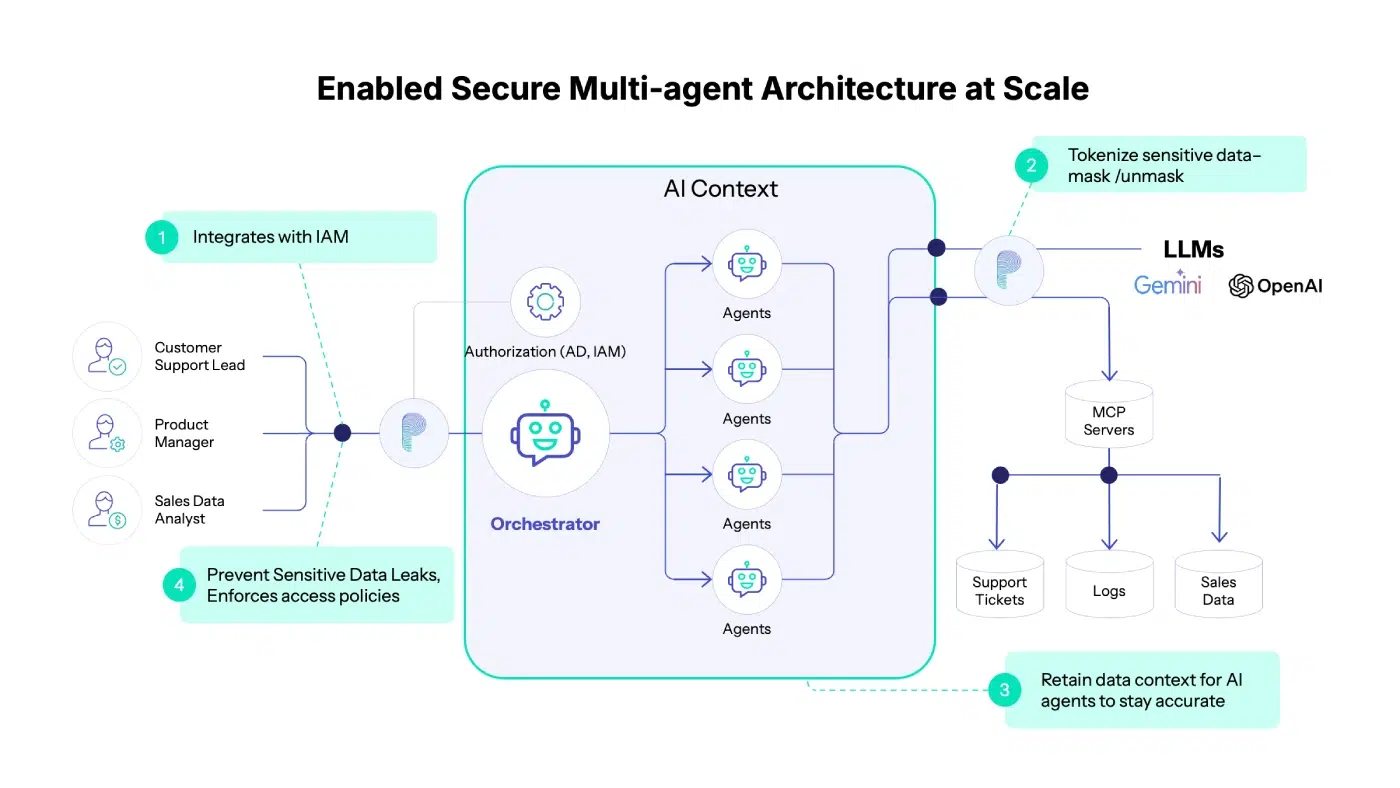
Step 1: Keep Active Directory for Authentication and Authorization
Nothing changed about identity management:
- AD continued to handle authentication
- AD determined roles and group memberships
- AD answered “Who is making this request?”
Protecto didn’t replace or duplicate identity systems. No new identity silos, no changes to existing access control, no disruption to governance already in place.
Step 2: Add Policy Enforcement Based on Identity
Once a request was authenticated and authorized by AD, Protecto handled the data layer.
Here’s how it worked:
- A user makes a request
- AD authenticates: “This is user X with role Y”
- Protecto evaluates: “What policies apply to this user, for this data?”
- Data is dynamically modified based on policy
- The user receives only what their role permits
Policy setup was a single API call: specify which entities to mask, redact, or allow based on user roles. The team could use Protecto’s default entity definitions (PERSON, EMAIL, PHONE_NUMBER, CREDIT_CARD) or create custom entities specific to their business (PRODUCT_ID, SUPPLIER_SKU, DISCOUNT_RATE).
These policies applied uniformly, regardless of:
- Which data source (MCP) the data came from
- Which agent requested it
- Which downstream tool or agent consumed it
How It Worked in Practice
When an AI agent requested customer data:
- Authentication: AD verified the request and identified the user role
- Policy Selection: Protecto identified applicable policies based on role
- Data Transformation: Data was dynamically modified:
- Phone numbers → masked (XXX-XXX-1234)
- Email addresses → tokenized or redacted
- Customer names → visible or hidden based on role
- Product IDs → redacted for non-technical roles
- Delivery: The agent received appropriately protected data
No changes were required to:
- Active Directory configurations
- Existing data sources or databases
- Agent logic or MCP implementations
Protecto plugged into the workflow as a policy enforcement layer.
Agentic AI Without the Risk
Within weeks, the impact was visible.
| Outcome | Impact |
| Faster Deployment | New agents no longer required custom security logic. Time from concept to production dropped significantly. |
| Reduced Risk | Sensitive PII and business data stayed protected even as agents became more autonomous. |
| Auditability | Policies were centralized, explicit, and easy to review during compliance audits. |
| Flexibility | Policies evolved as use cases changed without requiring code rewrites or agent redeployment. |
| Enterprise Trust | Security teams became comfortable scaling agentic AI, knowing controls were in place. |
The AI initiative moved forward without stalling. Security review stopped being the bottleneck. Product managers could experiment with new agent capabilities. Developers focused on building features, not implementing data filters.
Data Control Is the Missing Layer
Agentic AI doesn’t fail because enterprises lack authentication systems or identity governance. Those foundations are typically solid.
It fails when data leaves a protected system and enters agentic AI workflows.
Traditional security asks: “Who are you, and what systems can you access?”
Agentic AI requires a second question: “Who are you, what are you trying to do, and what sensitive data do you actually need to see?”
By integrating with Active Directory for authentication and authorization while focusing on policy-driven data control, Protecto enabled this Fortune 50 enterprise to:
- Deploy autonomous agents safely across critical workflows
- Scale AI initiatives without creating new security risks
- Maintain compliance with data protection regulations
- Move fast without breaking trust
Making Agentic AI Governable
The choice between moving fast and maintaining security is a false one, but only if you have the right control layers in place.
This Fortune 50 company demonstrated that agentic AI can run at scale without losing control of data. Identity management handles who can access systems. Data governance handles what they should actually see. Both are necessary. Most enterprises have only built the first one.
With a dedicated data control layer in place, agentic AI is governable. And that’s what makes it viable for the use cases that actually matter.

