Applications in the modern age generate huge amounts of logs each second. Logs allow developers to debug issues, monitor systems, and track performance. However, logs often have sensitive information, including passwords, API keys, email addresses, and even payment details.
If this data is exposed in any way, it can lead to serious security and compliance risks. That is why organisations must mask sensitive data in logs before storing or sharing them. In fact, it can cause serious financial trouble: as IBM’s Cost of a Data Breach Report explains, the average global cost of a data breach reached $4.4 million in 2025.
In this guide, you will learn what log masking is, why it matters, and how to mask sensitive data in logs.
What Does It Mean to Mask Sensitive Data in Logs?
Masking sensitive data in logs essentially means replacing confidential information with hidden or partially visible characters before it is written to log files.
Let us understand this with an example.
Instead of logging:
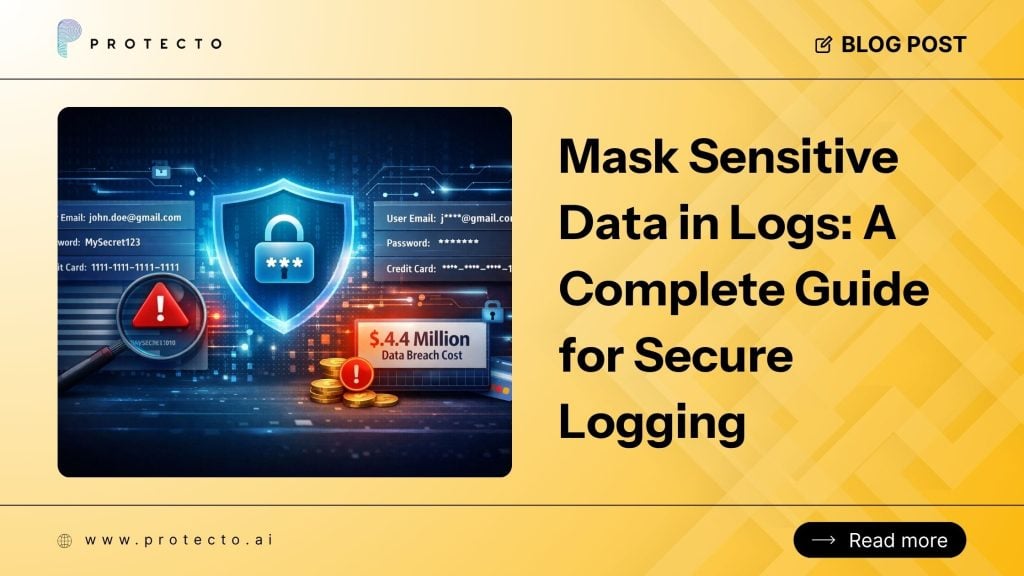
- User email: john.doe@gmail.com
- Password: MySecret123
- Credit Card: 1111-1111-1111-1111
A masked log would appear like:
- User email: j***@gmail.com
- Password: ********
- Credit Card: ****-****-****-1111
Masking is essential as the logs are much more secure and usable. It also protects sensitive information. Many organisations implement automated systems to mask sensitive data in logs. It helps to prevent developers from accidentally exposing any information.
This approach supports broader AI Data Security strategies and aligns with privacy-first development practices.
Common Types of Sensitive Data Found in Logs
Many types of confidential data can accidentally appear in logs. If applications do not automatically mask sensitive data in logs, developers may unknowingly expose critical user information.
Organisations must detect and mask sensitive data in logs that include:
- Passwords
- API keys
- Authentication tokens
- Credit card numbers
- Social Security numbers
- Email addresses
- Phone numbers
- Bank account details
- Personally identifiable information (PII)
Why Is It Important to Mask Sensitive Data in Logs?
Logging is necessary for debugging and system monitoring, but unprotected logs create serious risks. Here are the main reasons companies must mask sensitive data in logs.
-
To Prevent Data Breaches
Logs are often stored in centralised systems that many engineers can access. If sensitive data appears in logs, attackers can easily steal credentials or personal data. Masking data ensures that even if logs are exposed, attackers cannot use the data.
-
To Maintain Regulatory Compliance
Many regulations require organisations to protect personal data. Examples include:
- GDPR
- HIPAA
- PCI DSS
- CCPA
Implementing systems that mask sensitive data in logs helps organisations stay compliant with privacy regulations and reduces the risk of AI-generated data that violates privacy regulations.
-
To Protect User Trust
Customers now expect companies to protect their personal information against leaks, which can lead to fraud. If logs expose sensitive data such as passwords or authentication tokens, it damages brand reputation and user trust.
Security-focused companies need to understand the Privacy-First vs Privacy-Later approach to know why privacy is the first priority. They design systems that mask sensitive data in logs from the onset rather than fixing problems after a breach.
Best Practices for Masking Sensitive Data in Logs
To do this correctly, you need a plan. Here are some practices to follow:
Identify Sensitive Fields: Make a list of everything that needs to be hidden. This includes names, emails, tokens, and financial data.
Use Automated Tools: Do not rely on developers to remember to hide data.
Apply Role-Based Access Control: Even if data is masked, not everyone should be able to see the logs. Only people who need to fix bugs should have access.
Check Your Logs Frequently: It helps to ensure no new sensitive fields slip through.
The Risks of Ignoring Log Security
When you do not mask sensitive data in logs, you create a huge “attack surface.” Hackers love looking for log files because they are often less protected than the main database.
If a hacker gains access to your log server, they can find enough information to take over user accounts or steal identities. Furthermore, masking sensitive data in logs is not just about hackers. It is also about internal trust.
Even good employees should not have access to private customer data that they do not need for their job.
What Are the Challenges in Log Data Masking?
Although log masking is important, implementing it correctly can be challenging. Here are some of the most common challenges that organisations face:
Performance Overhead
Complex masking rules may slow down logging pipelines. Organisations need to create a balance between performance and security.
Incomplete Pattern Detection
If masking rules miss certain patterns, sensitive data may still appear in logs. This creates hidden data compliance risk, especially in AI-powered applications that process large datasets.
Developer Awareness
Many developers are unaware of how easily sensitive data appears in logs. Security training and automated tools are non-negotiable in order to ensure teams consistently mask sensitive data in logs.
Step-by-Step: Implementing a Masking Strategy
To properly mask sensitive data in logs, follow this simple workflow:
- First, select your pattern. Most people use “Regular Expressions” (Regex). Regex is a way to tell the computer to look for a specific shape of data, like a sequence of 16 digits for a credit card.
- Second, integrate it into your framework. If you are using Java, you will look into how to mask sensitive data in logs with Logback. If you are using a different language like Python or Node.js, the tools will change, but the logic stays the same.
- Third, test the masking. Run your app in a safe environment and try to log sensitive info. Check the output. If you look at the actual data, your filter is not working. You must see the masked version.
Common Mistakes to Avoid
Even when trying to mask sensitive data in logs, people make mistakes. Here are a few to watch out for:
Masking Too Much
If you hide the “User ID,” it might be impossible for a developer to determine which user caused the error. Only mask the private parts, not the helpful parts.
Forgetting Nested Data
Sometimes, sensitive information is hidden inside a complex object. Not handling it properly can lead to compliance risks.
Hardcoding Secrets
Never put the “keys” to your masking logic in the code itself. Use secure configuration management.
Conclusion
Securing your logs is just as important as securing your database. By taking the time to mask sensitive data in logs, you are closing a major gap in your security wall. It keeps your developers productive by letting them see the logs they need, while keeping your customers’ private details hidden.
Organisations must implement strong policies to mask sensitive data in logs so that private information never appears in plain text. Remember, security is not a one-time task. It is a habit. Make masking sensitive data in logs a standard part of your development process.
Protect your logs, protect your data, and protect your future.
Frequently Asked Questions
What types of data should be masked in application logs?
Common types of data that organizations should mask sensitive data in logs include passwords, API keys, credit card numbers, authentication tokens, Social Security numbers, email addresses, and personal user information. Masking these fields reduces the risk of data breaches and protects sensitive customer data.
What risks occur if sensitive data appears in logs?
If organizations fail to mask sensitive data in logs, attackers may gain access to personal information, authentication credentials, or financial data. This can lead to identity theft, regulatory penalties, and reputational damage for the organization.
How does log masking help with compliance requirements?
Regulations such as GDPR, HIPAA, and PCI DSS require organizations to protect personal and financial data. Implementing systems that mask sensitive data in logs helps companies comply with necessary regulations and avoid legal penalties.
Can API requests expose sensitive data in logs?
Yes, API requests tend to have authentication tokens, session IDs, or user information. If developers log entire API requests without filtering, sensitive information may appear in logs. Implementing policies to mask sensitive data in logs helps prevent such exposure.
What happens if companies fail to mask sensitive data in logs?
If organizations fail to mask sensitive data in logs, they risk data leaks, regulatory fines, and reputational damage. Exposed log data can give attackers access to credentials, user information, or financial details, making proper log masking a critical part of modern cybersecurity.