
Regex works in a demo. Production data is different.
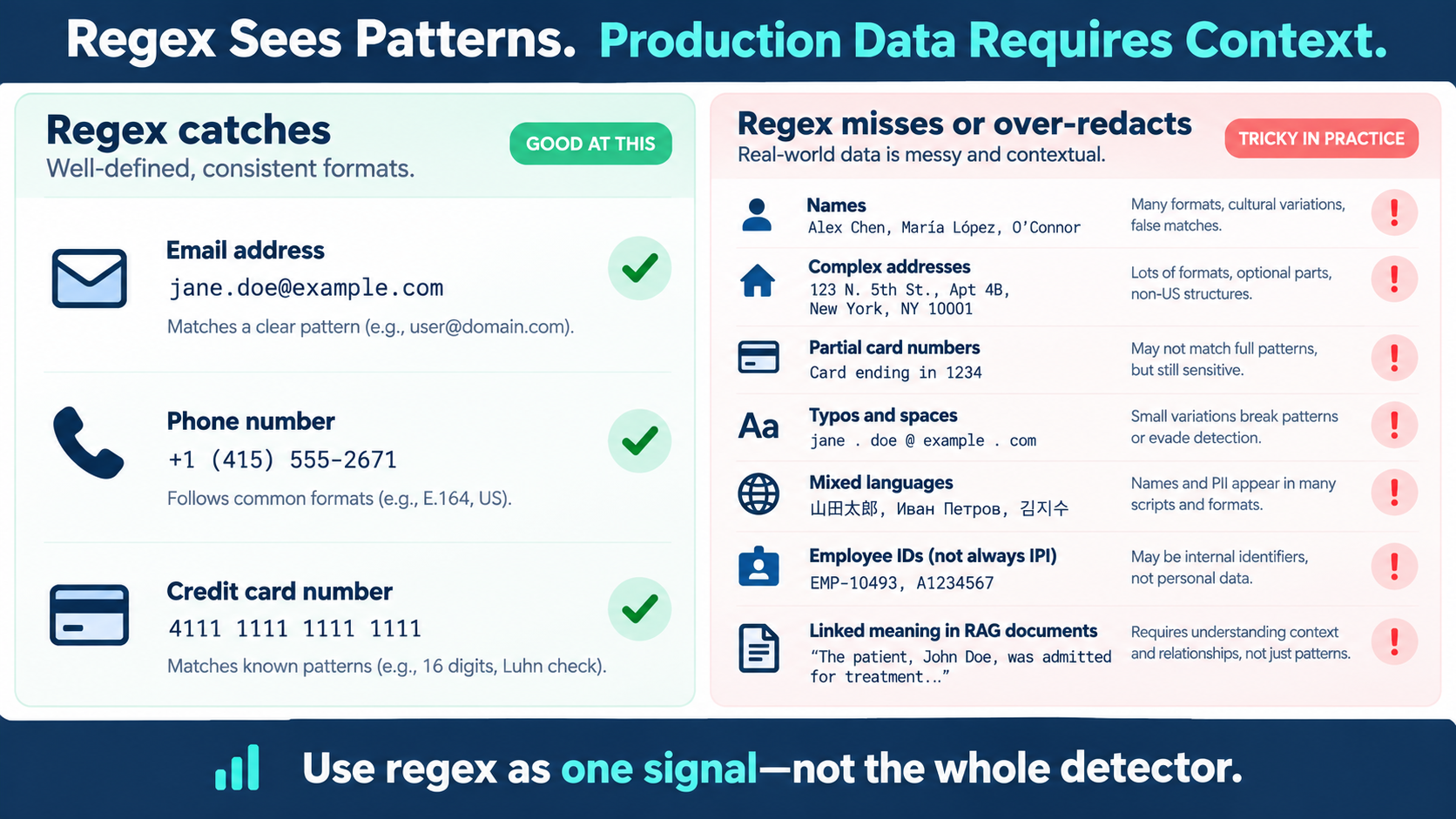
Regex PII Redaction. Regex is useful when sensitive data has a stable shape. A conventional email address contains @. A phone number often follows a known numbering format. A full payment-card number may have a predictable length and can be checked with the Luhn algorithm.
The trouble starts when those clean examples are treated as representative of the data flowing through modern AI systems.
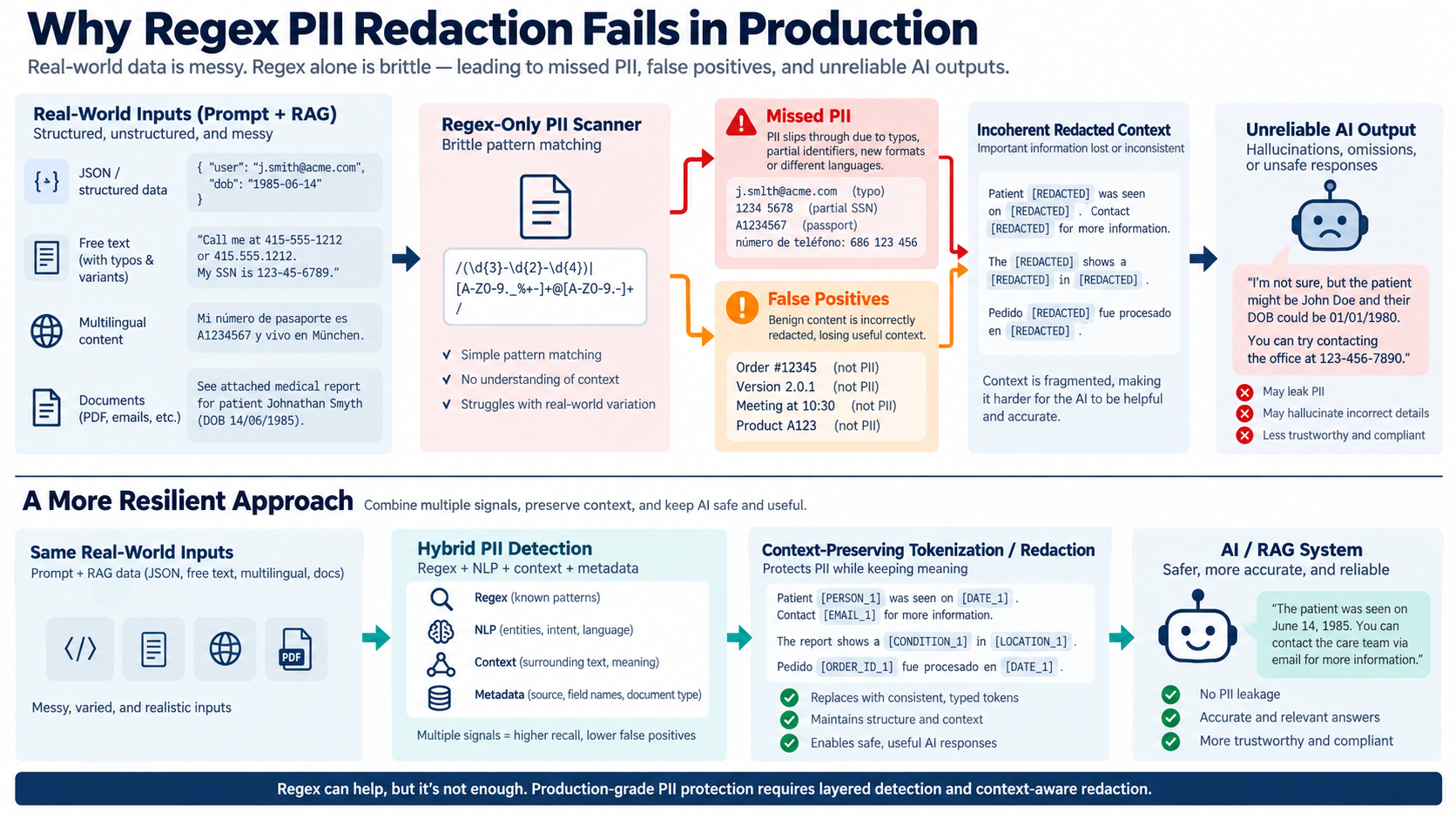
Real prompts, support tickets, CRM notes, uploaded documents, RAG passages, and agent tool calls are usually a mixture of structured and unstructured content. A single request may contain JSON, a pasted email, a misspelled name, a partial identifier, and a sentence written in two languages. Documents may contain OCR errors, broken lines, tables, headers, and references that only become sensitive when read together. An agent may pull pieces of the same identity from separate tools before it takes an action.
For example:
{"customer":"Maria Lopez", "note":"pls call me at five five five one two 88"}
A human can infer that the note contains a phone number. A regex rule sees an unexpected sequence of words. The reverse problem is just as serious: a rule designed to catch every nine-digit sequence may redact an employee ID, case number, or tracking reference that is not PII.
Regex is not the problem. The problem is asking pattern matching to understand context.
Five ways regex PII redaction fails in production
1. It misses PII that does not have one stable format
Names, addresses, medical information, and many identifiers do not have one universal pattern.
Consider these examples:
Patient: Dr. Ananya Rao
Address: Flat 4B, 12 N. 5th Street, near the old market
The name is sensitive because of the surrounding patient context. The address may be split across lines or written using local conventions. Neither case can be handled reliably by adding a few more character patterns.
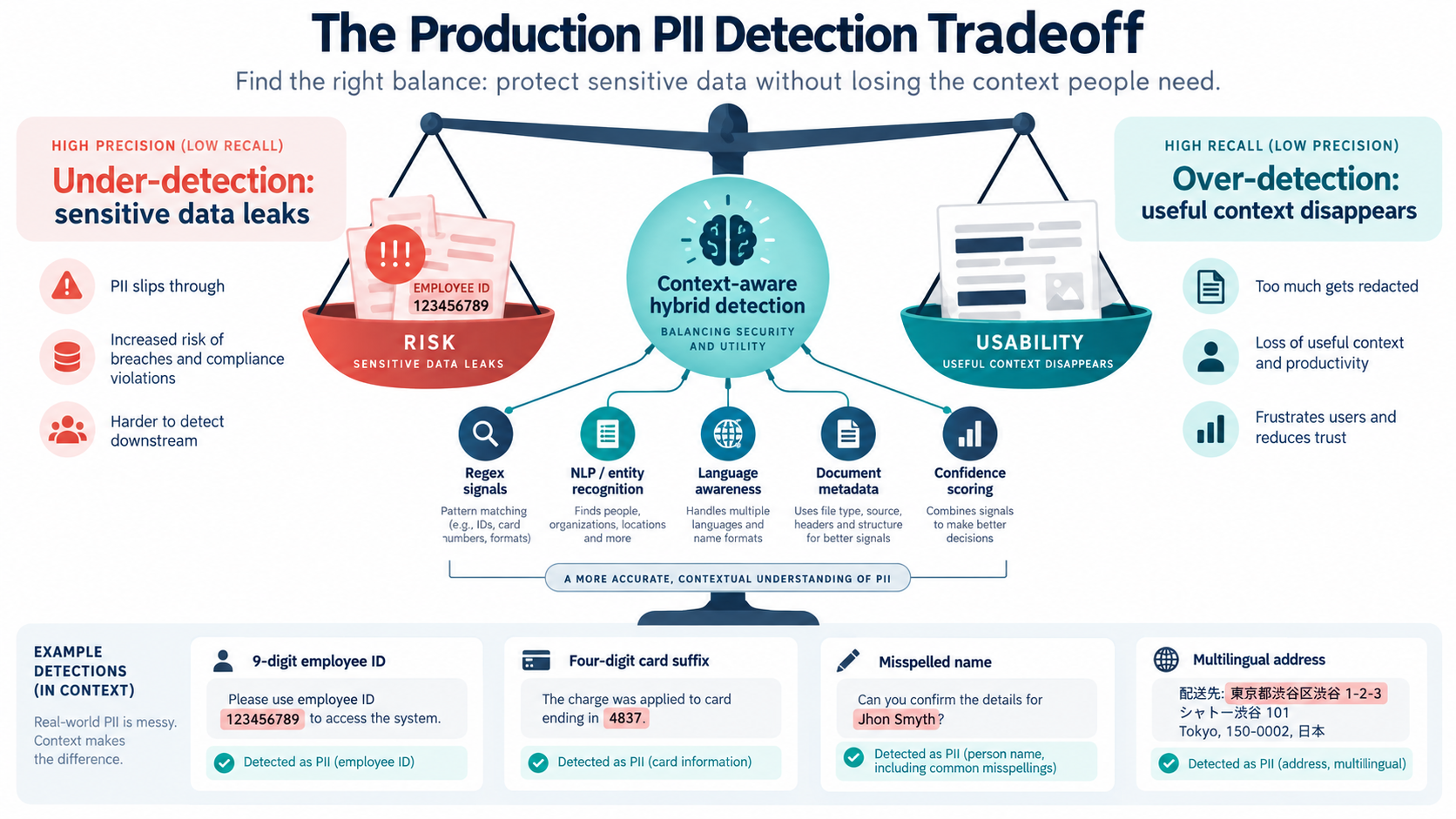
Names also vary by language, culture, transliteration, punctuation, and ordering. A detector that works for John Smith may struggle with an Indian name, an Arabic name, a name written in another script, or a misspelled name copied from a document.
2. It misses partial, damaged, or obfuscated identifiers
Production inputs often contain only part of an identifier:
The charge was made on the card ending in 4837.
Those four digits may be sensitive card information, but they do not match a full card-number pattern. The same is true for a partial account number, a shortened phone number, or an identifier split by spaces and punctuation.
Typos and OCR create more failure modes:
My card is 4111 1111 1111 11l1
Please contact jane . doe @ example . com
The first value contains a letter where a digit should be. The second contains spaces that break a conventional email pattern. A brittle detector misses both even though the surrounding context makes the sensitivity clear.
3. It over-redacts ordinary data
The obvious response to missed cases is to broaden the rules. That increases recall, but it also increases false positives.
Employee ID: 123456789
Order number: 123456789
Meeting starts at 10:30
Product code: A1234567
A rule that removes every nine-digit number cannot know whether a value is a national identifier, an employee ID, an order reference, or an internal case number. A rule that removes every four-digit number may destroy years, room numbers, postal fragments, or card suffixes without understanding what the number means.
Over-redaction is not a harmless side effect. It makes documents less useful, increases operational load, creates alert fatigue, and can encourage teams to bypass privacy controls.
4. It struggles with multilingual and mixed-language input
AI systems increasingly process global customer and employee data. A prompt may combine English with Hindi, Arabic, Spanish, or another language. Names, addresses, honorifics, dates, and number conventions vary by locale.
Regex can match a literal character sequence, but it does not understand whether a phrase in another language is a person’s name, an address, or medical information. It also cannot reliably interpret a name written in a different script or recognize that two differently transliterated forms refer to the same person.
Language variation is not an edge case for production AI. It is normal input.
5. It destroys meaning across documents, RAG, and agent tool calls
PII rarely appears in isolation. The sensitivity and the usefulness often come from relationships between entities.
John introduced Sarah to Michael during the Delta Bank migration.
Sarah later approved Michael's proposal after discussing it with John.
Blanket redaction produces:
[REDACTED] introduced [REDACTED] to [REDACTED] during the [REDACTED] migration.
[REDACTED] later approved [REDACTED]'s proposal after discussing it with [REDACTED].
The sensitive names may be hidden, but the AI can no longer track who introduced whom or who approved the proposal. In a RAG workflow, deleting selected spans can make a retrieved passage incoherent and cause the model to miss relationships, invent connections, or return an incomplete answer. The same problem carries into agent tool calls: if an agent sees a different placeholder in the CRM, billing system, and knowledge base, it cannot reliably tell that it is working on the same customer.
The goal is not merely to make sensitive text unreadable. The goal is to reduce risk while preserving the context required for safe, accurate work.
6. Every new sensitive type becomes another rule
Regex rule sets do not just miss unusual PII. They turn every new sensitive type into another hand-written rule. Project codenames, deal names, pricing terms, internal customer IDs, and company-specific language do not arrive with a standard format. Teams add a rule, then another exception, then a rule to keep the first rule from catching the wrong thing. The set grows, rules conflict, and ownership becomes unclear.
Agentic data classification takes a different starting point. Instead of requiring a new pattern for every case, it can apply a policy definition or examples to the data in context. That matters for the sensitive information enterprises care about most, because much of it does not look like PII at all.
Sensitive data is more than PII
PII is only one part of the problem. A deal name, an internal project codename, a pricing exception, a customer list, or a note about an acquisition may not match a standard PII category. It can still be the information that causes the real business impact if it reaches the wrong model, person, or tool. Agentic data classification gives teams a way to define these categories in their own terms and apply that definition consistently as data moves through prompts, RAG, and agent actions.
Regex sees patterns. Agentic data classification understands the task and context.
Regex has a valuable role for known, structured formats. It is fast and precise when the pattern is well understood. It should not be the system that decides whether data is sensitive in an AI workflow.
| Approach | Good at | Limitation |
|---|---|---|
| Regex | Known formats such as email, phone, and card patterns | Brittle when formatting changes or meaning depends on context |
| Agentic data classification | Applying policy definitions and examples to prompts, RAG documents, and agent tool calls in context | Requires clear policy definitions and governance |
| Data control plane | Applying the right control for the data, caller, task, and destination | Must be integrated into the AI and agent workflow |
What production-ready agentic data classification looks like
A production system needs to make decisions while traffic is moving, not pause every uncertain request for a person to review it. Agentic data classification evaluates the data alongside the task, the caller, the source, and the destination. It can apply policy definitions and examples to make a context-aware decision at runtime.
- Read the full interaction. Evaluate prompts, retrieved documents, agent tool calls, and structured data together where the task requires it.
- Classify from policy and context. Apply definitions and examples for sensitive categories, including business-confidential information that has no fixed pattern.
- Decide at runtime. Use the caller, agent, purpose, source, and destination to determine what should be protected and how.
- Apply the right transformation. Use format-preserving or consistent tokenization when the downstream system needs structure and identity. Use a context-preserving rewrite when sensitivity lives in the meaning of a sentence or relationship.
- Enforce through the data control plane. Keep protected values out of the agent context unless a policy permits a narrow, purpose-bound use.
- Measure continuously. Track missed sensitive data, unnecessary masking, and whether protected content still supports accurate retrieval, reasoning, and action.
That is the difference between a scanner that looks good in a demo and a data control plane that holds up in production.
Redaction versus context-preserving protection
Traditional redaction replaces a sensitive value with [REDACTED]. That may be appropriate when no downstream system needs the value or its shape. But it can break workflows that need to compare, classify, summarize, or act on the protected data.
Context-preserving approaches use the least destructive transformation that satisfies the policy:
- Format-preserving masking keeps a value’s type and shape without exposing the original.
- Consistent tokenization maps the same entity to the same stand-in across prompts, RAG documents, databases, agent tool calls, and turns.
- Context-preserving rewriting creates a faithful lower-sensitivity version when the sensitive information lives in the surrounding meaning.
For example, John Smith may become Person_42 everywhere in a workflow, while a sensitive pricing sentence may need to be rewritten as “a senior executive approved a strategic pricing exception.” The right choice depends on the AI consumer and the task.
For more detail, see Context-Preserving Masking: Protect AI Accuracy.
How to evaluate agentic data classification before production
Do not evaluate only on clean examples. Build a test set that reflects actual traffic:
- JSON mixed with natural-language prompts and agent tool payloads
- typos, OCR errors, inserted spaces, and concatenated values
- partial card numbers and shortened identifiers
- complex, multi-line, and international addresses
- Indian, Arabic, and other multicultural names
- mixed-language and mixed-script prompts
- document, RAG, and agent tool-call sequences where relationships matter
- ordinary numbers that resemble PII, such as employee IDs and order numbers
- sensitive business context with no recognizable PII pattern, such as codenames, deal terms, pricing, and internal customer identifiers
Measure both sides of the risk:
- False negatives: sensitive data that reaches the model, vector store, log, or downstream tool.
- False positives: harmless content that is removed and makes the AI response less useful.
- Context preservation: whether the protected document still supports accurate retrieval, reasoning, and action.
- Consistency: whether the same entity remains identifiable as the same entity across the workflow.
The bottom line
Regex remains valuable for predictable, structured patterns. But production AI data is not predictable. It is noisy, multilingual, partly structured, spread across documents and tool calls, and often sensitive because of meaning rather than format.
Regex-only PII redaction therefore fails in two directions: it misses data that does not match a stable pattern, and it removes data that only looks sensitive when viewed without context. In prompts, RAG documents, and agent tool calls, indiscriminate redaction can also destroy the relationships an AI system or agent needs to produce accurate answers.
A production-grade approach uses agentic data classification to determine what is sensitive in context, then a data control plane to apply the right transformation and policy. Regex can still handle clean patterns. It cannot carry the full decision. Protect the data while preserving the meaning that makes AI and agents useful.