CBAC for AI
Context-Based Access Control for AI
Ingest unstructured data for AI and enforce the right access at runtime.
Enterprises want to use AI without exposing sensitive data. That requires two things: unstructured data structured the right way for AI, and access enforced for each user, agent, and task. Protecto CBAC does both.
- Protecting sensitive data for 3,000+ enterprises





The Problem
AI needs more than ETL and access control.
User access is not task access. Old ETL tools were built to move data into fixed tables and schemas. Old access control was built for files, folders, apps, and databases.
AI works differently — it reads raw content, pulls from mixed data, and answers in real time. It needs a layer that structures data for AI and enforces the right access at runtime.
The Reality
Enterprise does not stay in neat categories.
A single document can mix medical notes, billing details, legal text, fraud signals, and internal comments — often in the same paragraph.
Old systems classify the whole document and block it. Block too much and AI loses context. Allow too much and sensitive data leaks into prompts, retrieval, and agent actions.
- Without CBAC, the choice is brutal: block too much and lose the value of AI, or allow too much and accept the risk of leaking sensitive data.
What CBAC Does
Two jobs. One layer built for AI.
Structures unstructured data for AI
It understands the content, reads enterprise policies on what is sensitive, segments it the right way, and keeps it useful for retrieval.
Enforces the right access at runtime
It checks who is asking, what they are asking, and what policy should apply — returning only the chunks that role, task, and context should see.
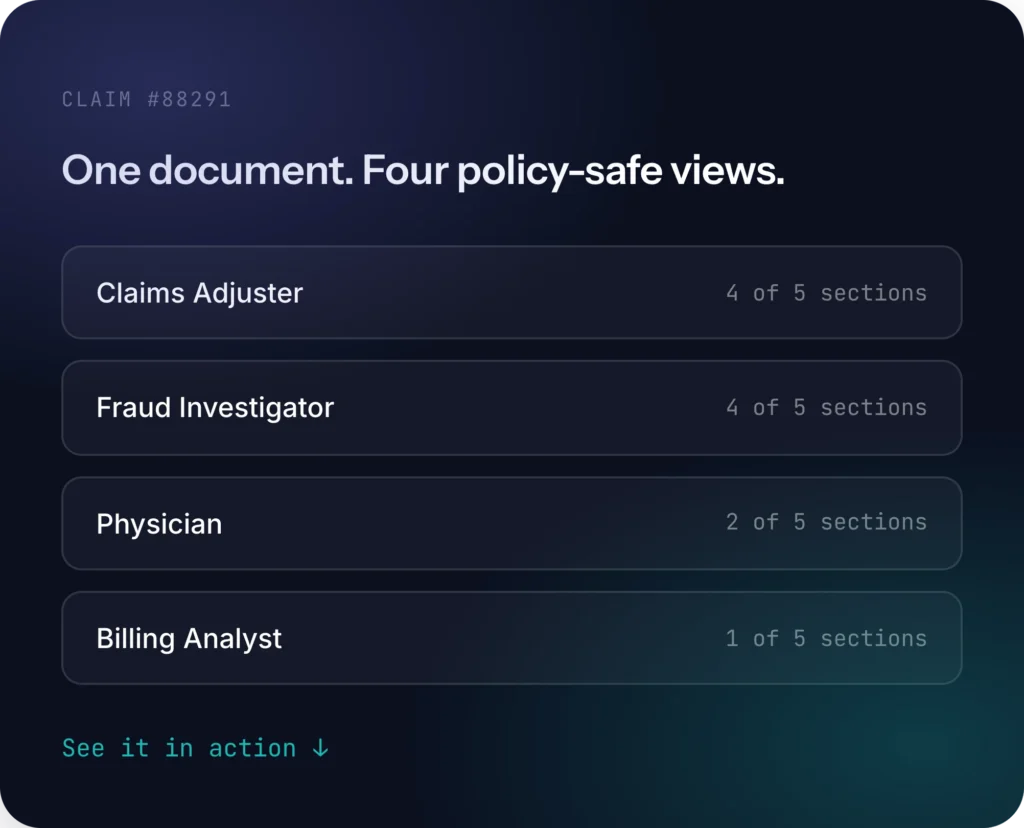
The same source document can be used in different ways for different roles, without losing control or stripping away too much context.
Same account note. Four different, policy-safe views.
AI agents call tools, chain actions, and pull data across systems. Once data enters a prompt or payload, your existing access controls lose visibility. The data is already exposed, and nothing is watching it. CBAC enforces at the moment the agent asks: who’s asking, for what task, and what they’re allowed to see. Static roles can’t anticipate this. User access is not task access.
Example: the same account note read by three agents and one tool call, no schema, no fixed fields.
The Architecture
Control when data enters — and again when the system answers.
Understand, segment, and mask — without rigid schemas.
CBAC reads the document, understands the content, segments it the right way, and masks sensitive values where needed. It creates structure that AI can use without forcing everything into fixed tables.
Check the user, role, task, and policy on every query.
CBAC enforces at the moment the agent asks: who's asking, for what task, and what they're allowed to see. You define policies in Protecto once and edit them as you need. You bind the policy to users and applications in your own AD or access control system. Protecto enforces them at execution time through an authorization key on every API call.
HOW WE COMPARE
See why leading enterprises choose Protecto.
Metadata and source-path controls were built for files and folders. CBAC was built for the way AI actually reads, retrieves, and generates.
| Feature | Protecto CBAC | Metadata / source path controls |
|---|---|---|
| Works on | ✓ Content inside documents | ! File location, source, metadata, partial internal content |
| Granularity | ✓ Section or sentence level | ✕ Document level |
| Understands meaning | ✓ Yes | ! Limited — mostly classification |
| Runtime enforcement | ✓ Yes | ! Limited |
| AI usefulness | ✓ Keeps more usable context | ✕ Often hides too much |
Real-World Use Cases
Built for the document patterns enterprises actually have.
Insurance
An adjuster asks about treatment history and gets answers from hundreds of pages of mixed-format documents. CBAC ensures PHI, fraud signals, and financials are filtered by role — not blocked wholesale.
Healthcare
Protect PHI in clinical transcripts while keeping enough clinical context for diagnostic accuracy. CBAC masks identifiers but preserves the surrounding medical detail AI needs.
Financial Services
Block account details, salaries, or contract values from unauthorized roles while still enabling AI-driven analytics. Same document, different financial views per team.
Enterprise Multi-Agent Systems
Apply tenant- or team-specific rules across agent-to-agent and MCP-driven workflows. CBAC enforces policy at every handoff between agents.
Security & compliance
Certified, audited, and enterprise-ready
Independently verified controls and ready-to-use policies for the regulations your data must meet, whether deployed as SaaS, on-premises, or in an air-gapped environment.
SOC 2 Type II
Audited controls
ISO 27001
Certified ISMS
HIPAA
BAA available
GDPR
EU data ready
DPDP
India · pre-built
CCPA / CPRA
US privacy
- Independently verified to outperform AWS Comprehend and Microsoft Presidio · audit logs on every scan, mask, and unmask.
AI unlocks enterprise data. CBAC keeps it safe.
Without the right control layer, the same power that makes AI useful becomes a risk. CBAC structures data for AI, applies enterprise policy, and enforces access in context — so teams can move faster without the leak.
- SOC2 Certified
- HIPAA Compliant
- GDPR Ready
- ISO 27001