



CBAC for AI

Context-Based Access Control for AI

Ingest unstructured data for AI and enforce the right access at runtime.
Enterprises want to use AI without exposing sensitive data. Protecto CBAC structures unstructured data for AI and enforces context-based access at runtime for each user, agent, and task.
protecto.cbac(claim_88291)Illustrative
One claim file · five sections
Claims adjuster4 of 5 sections
MedicalBillingLegal<FRAUD>Notes
Fraud investigator4 of 5 sections
<MEDICAL>BillingLegalFraudNotes
Physician2 of 5 sections
Medical<BILLING><LEGAL><FRAUD>Notes
Billing analyst1 of 5 sections
<MEDICAL>Billing<LEGAL><FRAUD><NOTES>
ShownMasked by policy
Section levelNot the whole file
Every queryChecked at runtime
LoggedEvery access decision
Trusted by regulated enterprises & agentic platforms
Inovalon
Automation Anywhere
Citrix
Bank Of Muscat Logo
Dell
Case study result
Automation Anywhere, enterprise automation and AI platform
5,000+
Live enterprise tenants
Logged
Every reveal of original values
Isolated
Policy and retention per tenant
The problem

AI needs more than ETL and access control.

User access is not task access. Old ETL tools were built to move data into fixed tables and schemas. Old access control was built for files, folders, apps, and databases.

AI works differently. It reads raw content, pulls from mixed data, and answers in real time. It needs a layer that structures data for AI and enforces the right access at runtime.

The reality

Enterprise data does not stay in neat categories.

A single document can mix medical notes, billing details, legal text, fraud signals, and internal comments, often in the same paragraph.

Old systems classify the whole document and block it. Block too much and AI loses context. Allow too much and sensitive data leaks into prompts, retrieval, and agent actions.

Without CBAC, you have two bad options: block too much and lose the value of AI, or allow too much and accept the risk of leaking sensitive data.
What CBAC does

Two jobs. One layer built for AI.

The same source document can be used in different ways for different roles, without losing control or stripping away too much context.
01

Structures unstructured data for AI

CBAC understands the content, reads enterprise policies on what is sensitive, segments it the right way, and keeps it useful for retrieval.
AI-powered detection
02

Enforces the right access at runtime

CBAC applies context-aware access control by checking who is asking, what they are asking, and which policy applies. Then CBAC returns only the content that the user's role, task, and context should allow.
Accuracy-preserving

Same account note. Four different, policy-safe views.

AI agents call tools, chain actions, and pull data across systems. Once data enters a prompt or payload, your existing access controls lose visibility. The data is already exposed, and nothing is watching it. CBAC enforces at the moment the agent asks: who’s asking, for what task, and what they’re allowed to see. Static roles can’t anticipate this. User access is not task access.

Account activity noteExample

Example: the same account note is accessed by three agents and one tool call, with no fixed schema or fields.

Who is reading this note?(click a tab to switch)

Raw note before any policy runs. Every entity is visible.

→ This is what enters the model before CBAC evaluates the request.

Every access decision is logged, who, what, when, why.

Control data when it enters and again when the system answers.

A support agent, a sales analyst, and a CRM tool all read the same account note. Protecto structures the note at ingestion, then checks who is asking and for what task on every request, so each one gets only what its policy allows.
Real timeChecks every request at runtime: retrieval, agent handoffs, MCP tool calls, and model input.
Architecture: documents and records pass through Protecto CBAC. Protecto structures and masks the content at ingestion, checks the user, role, task, and policy on every request, sends tokens to AI models and to roles that may not see the values, releases real values to tools and roles only by policy, and logs every access decision.Your AI stack · SaaS, on-prem, private cloud, or air-gappedModel providers · their cloudYour dataContracts and filesMixed documentsAccount notesFree text, no schemaClaims and recordsPHI, billing, fraudCRM and databasesStructured recordsProtecto CBACBetween your data and every reader1StructureSegment content at ingestion2MaskSensitive values, by policy3Check the requestUser, role, task, policy4LogEvery access decisionPolicies bound to your AD or access controlAccess logWho asked, for what task, andwhich values each reader got.Sales analyst agentTokensVector index (RAG)TokensSupport agentAccount, loggedMCP tool callKeys, loggedTokens onlyAI modelsAny providerOpenAIAnthropicGooglexAIOr a model you host,for example with OllamaSees tokens onlyAnswers come back with tokens.Protecto restores real values only forthe roles and tools your policy names.John Smith[PERSON_1]#1245[ORG_1]#1245[PERSON_1]Architecture: documents and records pass through Protecto CBAC. Protecto structures and masks the content at ingestion, checks the user, role, task, and policy on every request, sends tokens to AI models and to roles that may not see the values, releases real values to tools and roles only by policy, and logs every access decision.Your AI stackSaaS, on-prem, private cloud, air-gappedContracts andfilesAccount notesClaims andrecordsCRM anddatabasesProtecto CBAC1StructureSegment content at ingestion2MaskSensitive values, by policy3Check the requestUser, role, task, policy4LogEvery access decisionSales analystTokensVector indexTokensSupport agentAccount, loggedMCP toolKeys, loggedAccess logWho asked, for what task,and which values each reader got.Tokens onlyModel providers · their cloudAI models, any providerOpenAIAnthropicGooglexAIOr a model you host, such as OllamaSees tokens only. Answers come back with tokens,and Protecto restores values only by policy.
Real valuesTokensAnswers coming back
At ingestion

Understand, segment, and mask without rigid schemas.

CBAC reads the document, understands the content, segments it the right way, and masks sensitive values where needed. It creates structure that AI can use without forcing everything into fixed tables.
At runtime

Check the user, role, task, and policy on every query.

CBAC enforces at the moment the agent asks: who's asking, for what task, and what they're allowed to see. You define policies in Protecto once and edit them as you need. You bind the policy to users and applications in your own AD or access control system. Protecto enforces them at execution time through an authorization key on every API call.
How we compare

How CBAC compares with metadata and source-path controls.

Metadata and source-path controls were built for files and folders. CBAC was built for the way AI reads, retrieves, and generates.
FeatureMetadata / source path controlsProtecto CBAC
Works on File location, source, metadata, partial internal content Content inside documents
Granularity Document level Section or sentence level
Understands meaning Limited, mostly classification Yes
Runtime enforcement Limited Yes
AI usefulness Often hides too much Keeps more usable context
Real-world use cases

Built for the document patterns in real enterprises.

Insurance

An adjuster asks about treatment history and gets answers from hundreds of pages of mixed-format documents. CBAC ensures PHI, fraud signals, and financials are filtered by role instead of blocked wholesale.

Healthcare

Protect PHI in clinical transcripts while keeping enough clinical context for diagnostic accuracy. CBAC masks identifiers but preserves the surrounding medical detail AI needs.

Financial services

Block account details, salaries, or contract values from unauthorized roles while still enabling AI-driven analytics. Same document, different financial views per team.

Enterprise multi-agent systems

Apply tenant- or team-specific rules across agent-to-agent and MCP-driven workflows. CBAC enforces policy at every handoff between agents.
Security & compliance

Audited controls and ready-to-use policies

Independently verified controls and ready-to-use policies for the regulations your data must meet, whether deployed as SaaS, on-prem, in a private cloud, or air-gapped.

SOC 2 Type II

Audited controls

ISO 27001

Certified ISMS

HIPAA

BAA available

GDPR

EU data ready

DPDP

India privacy law

CCPA / CPRA

US privacy
Independently verified to outperform AWS Comprehend and Microsoft Presidio · audit logs on every scan, mask, and unmask.

“Protecto enabled us to deliver data security, privacy, and compliance for our AI features at scale across 5,000+ enterprise clients, strengthening customer trust in our AI automation solutions.”
SS
Steve Shah
SVP Product, Automation Anywhere
Resources

Go deeper.

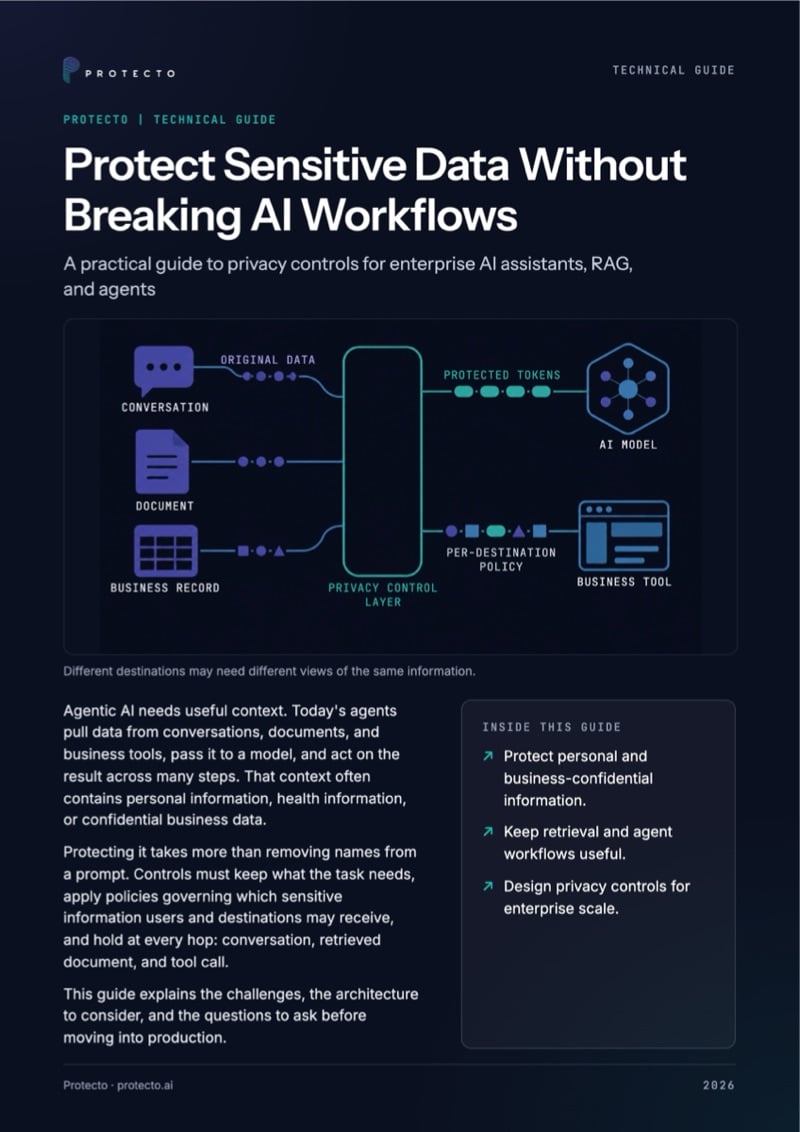
Cover Of The Guide Protect Sensitive Data Without Breaking Ai Workflows
Guide · 8 pages

Protect Sensitive Data Without Breaking AI Workflows

How to give each user, agent, and tool its own view of the same data, with a checklist for production.

Common questions

What is CBAC (Context-Based Access Control)?

CBAC stands for Context-Based Access Control. It determines access using the context of each request rather than relying only on static permissions. In Protecto, CBAC evaluates who is requesting access, the user’s role, the task being performed, the applicable policy, and the sensitivity of the content before deciding what data an AI system or agent can use.
Role-based access control typically determines what a user can access based on a predefined role. Context-Based Access Control adds the circumstances of the request, such as the task, policy, content sensitivity, application, and runtime context. This allows the same source data to return different policy-safe information depending on who is asking and why.
Protecto CBAC can be implemented by defining sensitivity and access policies, connecting those policies to users and applications through your existing identity or access-control system, and enforcing them during AI ingestion and runtime requests. Each API request is evaluated against the relevant user, role, task, and policy before protected content is returned.

No. You define policies in Protecto once and edit them as you need. You bind each policy to users and applications in your own AD or access-control system, and Protecto enforces it at execution time through an authorization key on every API call.

Yes, through Privacy Gateway. You keep each user’s masking and unmasking access in AD or Okta groups, and Gateway issues a Protecto auth key with that access at login. If you use Protecto Vault directly, it’s a headless API, so your team can build the integration around it.

Entity-based data such as names, IDs, card numbers, PII, and PHI, with 50+ built-in entity types plus custom entities. CBAC also controls context-based data that has no fixed pattern, such as pricing terms, fraud signals, HR notes, and legal strategy.

As SaaS, on-prem, in a private cloud, or air-gapped, so your documents and policies can stay inside your environment.

Yes. Protecto logs who asked, for what task, and which values each reader received, so security and compliance teams can review every decision. Book a demo to see the log on your own documents.

AI opens up enterprise data. CBAC keeps it safe.

Without the right control layer, the same power that makes AI useful can become a risk. CBAC structures data for AI, applies enterprise policies, and enforces access in context, so teams can move faster without increasing the risk of sensitive data exposure.
Cover of the guide Protect Sensitive Data Without Breaking AI Workflows
Technical guide

Protect sensitive data without breaking AI workflows

A practical guide to privacy controls for AI assistants, RAG, and agents. One workflow traced from request to CRM update, with what each destination may see.

By submitting you agree to Protecto’s privacy policy.
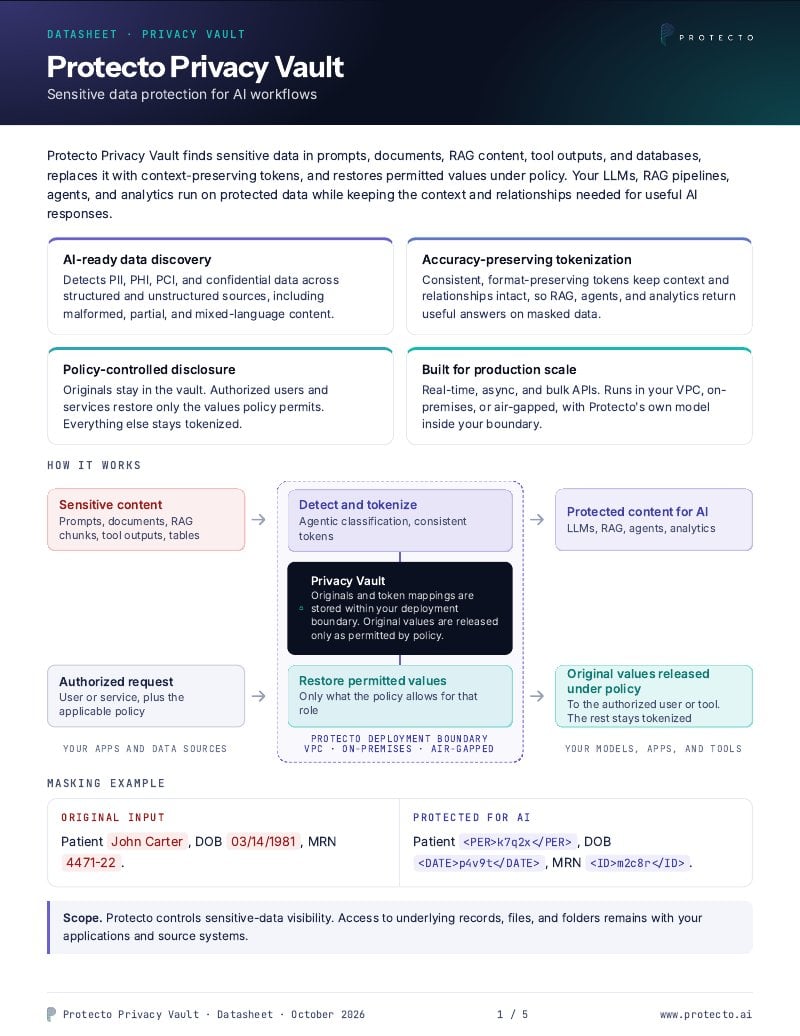
Cover of the Protecto Privacy Vault datasheet
Datasheet

Protecto Vault: sensitive data protection for AI workflows

Features that safeguard your data across agents, AI applications, RAG pipelines, MCPs, data lakes, and enterprise systems.

By submitting you agree to Protecto’s privacy policy.

New: run any AI model without exposing real values.
See how it works