Privacy Gateway for AI Chat
Use any model. The model never sees your sensitive data.
Protecto masks sensitive data (PII, PHI, etc.) before it reaches the model. Authorized users see the real values again. Tool calls still work when they need a real value.
Choose the best model for the job, without exposing sensitive data.
The constraint
Use the best model without exposing sensitive data.
Many teams self-host because they cannot send sensitive data to a hosted model like GPT or Claude. Protecto changes that. Your real values stay in your environment. The model receives masked values only.
| Before the Gateway | With the Gateway | |
|---|---|---|
| To keep sensitive data private, you had to | ✕ self-host, and accept whichever models you could run | ✓ Use any model. |
| Model choice was | ✕ a security decision | ✓ a quality decision |
| Frontier models were | ✕ off limits for sensitive work | ✓ available, because the model never sees real values |
Session persistence
Keep your conversation history private.
When you send a prompt to a hosted model, the exposure is not only the prompt you just sent. The session persists on the provider’s side: every earlier message, the context built across turns, the detail a user typed three questions ago. You control none of it. Not retention, not access, not training use, not third-party sharing.
Sensitive information also accumulates differently across a conversation than it appears in one prompt. Nothing in turn four looks sensitive on its own. Turns one through four together identify a patient.
Run a self-hosted chat interface behind the Gateway and the session stays on your infrastructure. The provider only ever holds masked values, on every turn, for the life of the conversation.
How it works
Protect data without breaking your workflow.
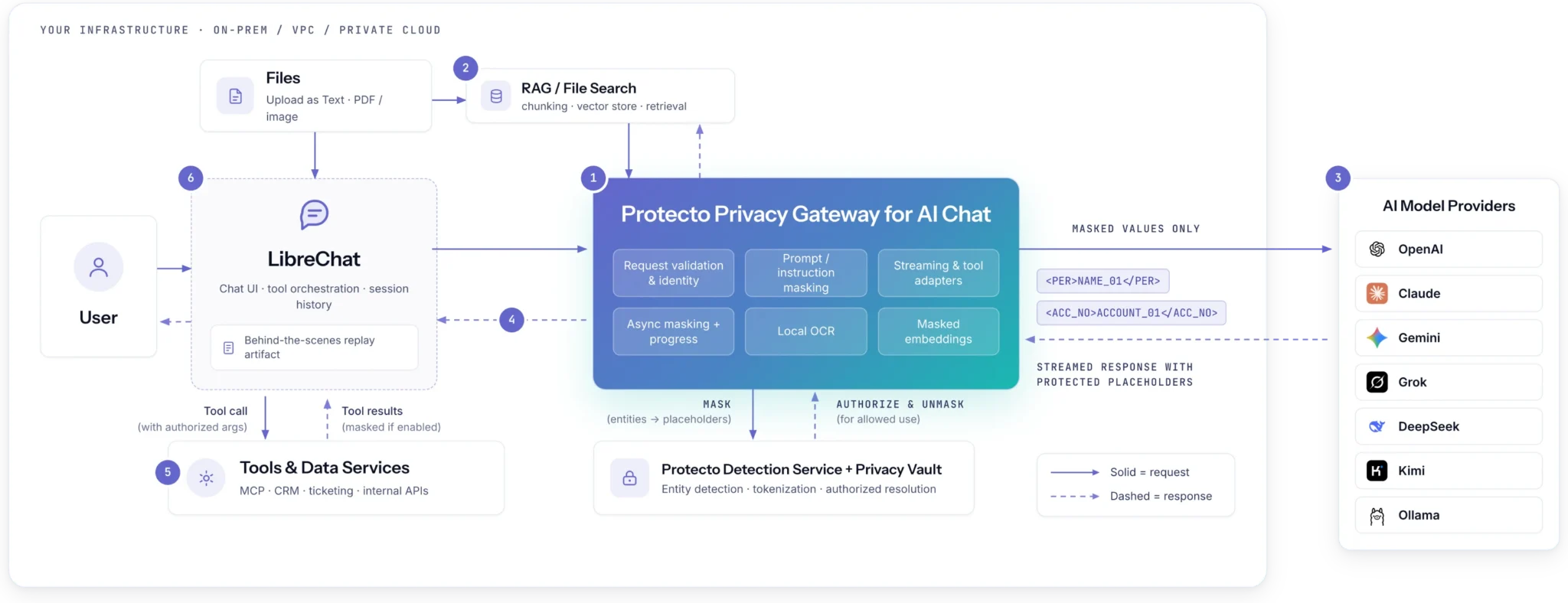
Protect the prompt
Protecto finds sensitive data and replaces it with protected values before the prompt reaches the model. (e.g. John change to WJKLS)
Protect files and RAG content
Protecto protects sensitive data in uploaded files and retrieved content before it enters the prompt.
Keep tool calls working
When an approved tool needs a real value, Protecto resolves it right before the tool runs. The model never sees the real value.
Return the right response
Protecto restores real values for the authorized user when the response comes back. (e.g. WJKLS changes back to John)
Why DLP breaks here
Masking is easy. Not breaking AI workflows is hard.
Basic masking can break a tool call when the tool needs a real customer ID, account number, or name. Protecto masks the sensitive data while allowing approved tool calls to use approved real values when needed.
- The tool call fails without authorized resolution. If a masked surrogate reaches a tool without authorized resolution, an exact-match lookup can fail or return no result, and the model answers confidently from nothing. Protecto Gateway resolves supported tool arguments at the tool boundary.
- Redaction and rescanning cost tokens, processing, and latency, unevenly. Redaction or surrogate markers can change token usage, while repeated scans at each workflow step add processing and network latency and may add service cost. The impact depends on value length, tokenizer, payload size, and replay behavior. A long value does not automatically inflate; a long value can become a shorter token and vice versa.
- Scan-then-forward delays the first token. Prompt inspection has to complete before the first model token can go out, because a scan-then-forward architecture needs the full payload before it can decide. Protecto Gateway can stream the model’s response afterward; how much of the preprocessing shows progress depends on the endpoint and tool-turn constraints.
Works with your stack
Works with your chat and model stack.
Any chat interface
Protecto runs behind your chat interface. You can keep the interface your team already uses. LibreChat integration is available today.
Protecto + LibreChat →
OpenAI and Gemini
Use OpenAI or Gemini while keeping real values out of the model request. Your model choice should be about quality, not data exposure.
Chat, on purpose
Built for chat workflows. Easy to integrate, so you know where it fits before you start a pilot.
Security & compliance
Built for regulated data at enterprise scale.
Protecto combines data protection, audit logs, and ready-to-use policies for regulated data across SaaS, on-premises, and air-gapped environments.
SOC 2 Type II
Audited controls
ISO 27001
Certified ISMS
HIPAA
BAA available
GDPR
EU data ready
DPDP
India · pre-built
CCPA / CPRA
US privacy
- Independently verified to outperform AWS Comprehend and Microsoft Presidio · audit logs on every scan, mask, and unmask.
FAQ
Common Questions
So you renamed Protecto Vault?
The detection and masking engine is Vault, and it is already in production at named enterprise customers. What is new is where it runs and what it does on the way back. The Gateway sits in the chat runtime path and resolves a tagged value at the tool boundary whenever it is present and the per-user Protecto token permits it, so tool calls resolve and the user sees real data while the model never held a real value.
What does this add to latency per turn?
Gateway latency depends on prompt size, entity density, selected model, synchronous versus asynchronous masking, and whether tool arguments require resolution. During deployment, Protecto measures median and tail latency against your representative prompt sizes and workflows.
What does the Gateway protect?
Protecto Gateway is designed to detect and mask supported entity-based sensitive data, including common personal, health, payment, account, government, and customer identifiers, before protected chat content reaches the model provider.
Where does the mapping between masked and real values live, and who can reach it?
Protecto is built primarily for on-prem, VPC, or air-gapped deployment — the mapping and the masked data stay inside your environment by default. Protecto maintains the authoritative token-to-value mapping in the configured Privacy Vault. The Gateway holds mappings transiently while processing a request, and your chat interface stores encoded replay data used to reconstruct masked history. Unmasking uses a per-user Protecto token. Access to the vault, chat interface artifacts, and operational logs must be restricted.
Why not just run a local model and skip all this?
A local model is a legitimate choice and plenty of good teams have made it. It is also a choice most teams made because it was the only one available, and it costs capability on every task where a frontier model is better. The Gateway does not argue against your local model. What changes is that using OpenAI or Gemini alongside it stops being a security decision.
Which chat interfaces does this work with on day one?
The Gateway is decoupled from the chat interface, so nothing in the architecture is tied to one UI. LibreChat is the integration available today. Open WebUI and other interfaces are available on request, and the fastest path is a short call where we look at your instance.
Does the model still produce good answers on masked data?
Yes, because the masking is context-preserving and format-preserving rather than blanket redaction. The model reasons over structurally intact, consistent values instead of blacked-out text. In a deployment at a large bank in the Middle East, semantic accuracy held up well after masking.
Can I attach a file directly to the model instead of pasting it into the prompt?
No. Attaching raw file bytes directly to the model provider is not supported. Files are read through the chat interface and masked before their content enters the prompt, which is what keeps the control in place.
Does the Gateway authenticate who is chatting?
No. The Gateway does not itself authenticate the chat session. It trusts caller-supplied identity and relies on network placement, the same as the systems in front of it. What it does control is what each authenticated user sees once identity is established: masking and unmasking run against policies keyed to user and group role, so teams see the values they’re permitted to see and nothing more.
See Protecto with your own workflow.
Bring the model and workflow you want to use. We will show you how Protecto keeps sensitive values protected.
- SOC2 Certified
- HIPAA Compliant
- GDPR Ready
- ISO 27001