
A Technical blog series on where sensitive data moves in an AI workflow, what decisions Protecto makes at each point, and what enterprises get from enforcing policy once instead of everywhere.
Contents
Introduction The Six Places Enterprise AI Touches Sensitive Data
Pattern 1 · Inside the Agent The Claims Agent That Compliance Wouldn’t Approve: Putting Protecto Inside an AI Agent ← You are here
Pattern 2 · API Gateway Integrate Once: Why AI Data Policy Belongs at the API Gateway, Not Inside Every Agent
Pattern 3 · AI Gateway Every Team Is Calling an LLM. One Policy Should Govern All of It: Protecto at the AI Gateway
Pattern 4 · MCP Gateway Your Agents’ Tools See More Than Your Agents Do: Protecto as the MCP Gateway
Pattern 5 · Agent Gateway When One Agent Hands a Case to Another: Protecto as the Agent Gateway
Pattern 6 · RAG PipelineThe Archive That Answers Back: Protecto in the RAG Pipeline
PATTERN 1 · PROTECTING SENSITIVE DATA INSIDE THE AGENT
The Claims Agent That Compliance Wouldn’t Approve: Putting Protecto Inside an AI Agent
Atlas Insurance had an AI agent ready to ship. Compliance said no. This is the story of why, and how putting Protecto inside the agent’s workflow turned a blocked project into a production rollout. The company here is an insurer, but swap in a bank’s support agent or a hospital’s scheduling agent and the story is the same: an agent that needs the full record to do its job, and a record full of things nobody downstream should see.
Part of a series on the six places Protecto fits into an AI workflow. Each article stands alone: a real-world style use case, where Protecto sits, what changes, and what the business gets out of it.
The situation
Atlas Insurance built Claire, an AI agent that answers the single most common question policyholders ask: “where does my claim stand?” Before Claire, that question meant a call center queue, an average eight-minute handle time, and an adjuster interrupted mid-review. With Claire, it’s a chat window and a thirty-second answer. To give that answer, Claire has to do what a human claims handler does. She pulls up the full case file, reads the claim history, checks what’s pending, and writes back a clear status. If the policyholder wants written confirmation, she emails it. The pilot worked. Policyholders loved it. Then Claire went through a security review, and the project stopped.
Why compliance said no
The reviewers asked one question the team couldn’t answer well: “who else sees the case file when Claire reads it?“
The honest answer was: more parties than anyone intended. A claim case file contains the policyholder’s Social Security number, bank account details for the payout, and injury and treatment notes. When Claire works on a claim, that file doesn’t stay with Claire. It goes to the LLM provider with every model call. It gets saved into Claire’s memory so she remembers the conversation next turn. It’s written into system logs that the engineering team uses for debugging. Every one of those is a copy of some of the most sensitive data Atlas holds, sitting in places that were never designed to hold it.
The team’s first fix was the obvious one: scrub anything sensitive before Claire sees it. That broke the product. With the identifiers scrubbed, Claire couldn’t match the claim to the policy. She couldn’t email a confirmation because the address was masked. And the scrubbing missed the things that mattered most, because a sentence describing an injury or a settlement position doesn’t look like a pattern a scanner catches. The team ended up with an agent that was too exposed for compliance and too blinded to work.
What changes with Protecto
Protecto sits inside Claire’s workflow, as a step Claire runs before data moves anywhere. The idea is simple: Claire still gets the whole case file, but the sensitive values in it are swapped for safe, consistent placeholders before it goes to the model, into memory, or into logs. When a real value is genuinely needed, say, the actual email address so the confirmation can be sent, Protecto releases that one value, for that one approved task, and nothing else.
One policy decision has to be made explicitly here, because it drives everything downstream: what happens to the clinical narrative? Atlas configured its policy to protect direct identifiers, name, government ID, contact details, account numbers, while permitting the de-identified injury and treatment description to reach the model, because assessing the claim requires understanding the injury. A different organization can configure the opposite: remove the clinical narrative entirely and let the agent work from claim metadata alone. Both are valid; what matters is that it’s a written policy rather than an accident. The examples below follow Atlas’s choice.
Here’s the same workflow, before and after.
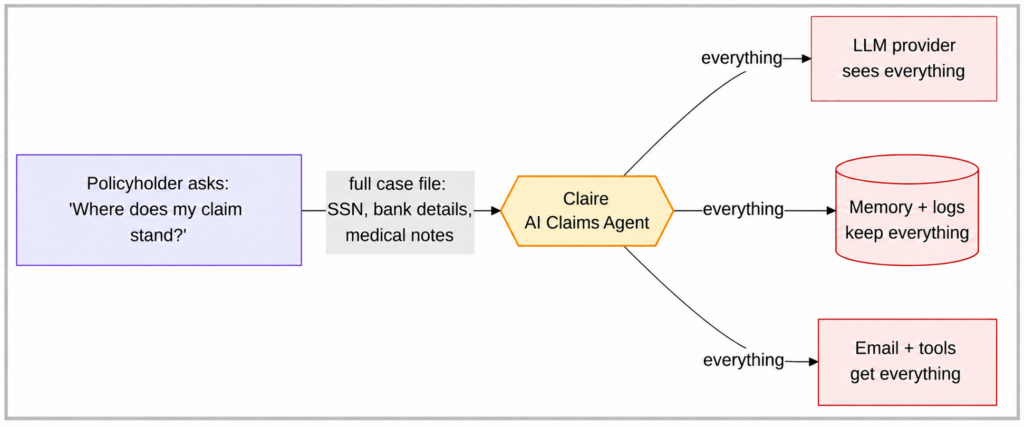
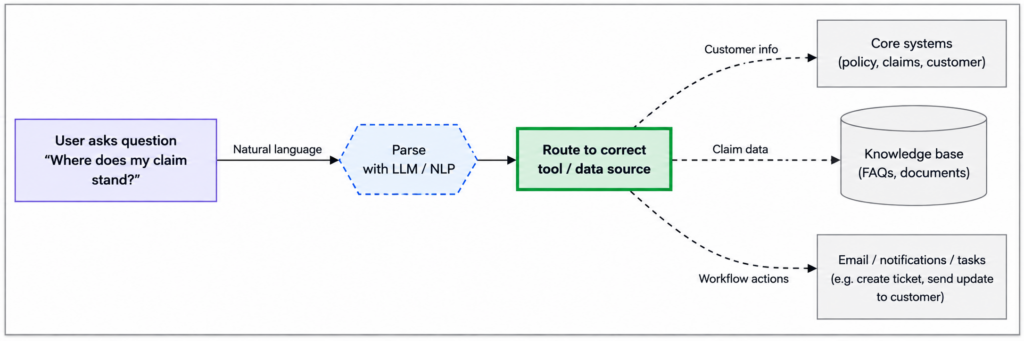
Three product details make this work in practice, and they’re worth understanding because they’re what separate this from simple redaction.
The placeholders are consistent. The same SSN always becomes the same placeholder. That sounds minor; it’s everything. It means Claire can still connect the claim to the policy to the payment history, because the connections between records survive. The model reasons over the case exactly as before. It just never sees the real values.
Real values move only on purpose. When Claire needs to actually send that email, she doesn’t get the real address by default. Unmasking isn’t a privilege the agent owns. It is controlled by policies defined for the user and the task. Protecto applies the appropriate policy, ensuring that each agent receives only the level of access to sensitive data it needs. So the email service gets the real address for the claim-status notification task, and nothing else real crosses with it.
The rules live in one place. What Claire can see, what the model can see, what gets revealed and when, all of it is policy that Atlas’s security team configures and owns. When the rules change, they change once, not in five places in the agent’s code.
The decisions, concretely
It’s worth making this specific, because “Protecto protects the data” hides the interesting part: a different decision gets made for each destination the data is headed to. Take one line of the case file as it comes out of the claims system:
Maria Torres · SSN 543-88-1201 · maria.t@email.com · Claim #CL-2291 · Payout account #88-4392 · Notes: "Soft tissue injury, physical therapy ongoing, requested expedited payout."
When Claire works on this claim, that one line becomes three different things depending on where it’s going:
What the LLM sees on every model call:
[NAME_2c88] · SSN [SSN_c419] · [EMAIL_a8f2] · Claim #CL-2291 · Payout account [ACCT_7d20] · Notes: "Soft tissue injury, physical therapy ongoing, requested expedited payout."
The direct identifiers are placeholders. The claim number and the de-identified injury description pass through, under the policy Atlas chose above, because assessing the claim requires understanding the injury. The placeholders are consistent, so [ACCT_7d20] means the same account everywhere it appears, and Claire can still connect this claim to the policy and the payment history. Under a stricter policy, that clinical sentence would be removed here too, and the trade Atlas accepted is that the model reasons better with it than without it.
What memory and logs keep is the same protected version. Six months from now, a debugging session or an over-broad log query turns up placeholders, not a customer’s SSN.
What the email tool gets depends on the task. You can’t send mail to a placeholder, so when Claire sends the confirmation, the policy for claim-status notifications permits the real address, and the email service receives maria.t@email.com. Nothing else real crosses with it, and the same agent asking for that address outside this task gets the placeholder. Same source line, three renderings, each matched to what that destination actually needs. That per-destination decision, made automatically on every hop, is the product.
The walkthrough
One request, end to end. A policyholder logs in and asks Claire about their claim.
Claire pulls the case file, and Protecto immediately protects it: the SSN, bank details, email, and name become placeholders, while the claim metadata and the de-identified injury description pass through under Atlas’s configured policy. Claire sends her question to the LLM, which reads a fully coherent case, reasons over it, and drafts a status update, without ever holding a real identifier. The conversation is saved to memory and logs in the same protected form, so the debugging trail contains nothing to leak.
The policyholder asks for written confirmation, so Claire requests the real email address for the approved notification task, Protecto releases it to the email service, and the confirmation goes out. Finally, Claire’s answer comes back to the policyholder with their own claim details visible, because the policy says a verified policyholder can see their own claim.
Every hop in that story either carried protected data or carried a real value under an explicit rule. Nothing leaked by default.
What customers get
The rollout went through on the second review, and the difference wasn’t a better argument, it was a better answer. “Who else sees the case file?” now had a specific reply: the LLM provider sees placeholders, memory and logs hold placeholders, and exactly one real value crosses to exactly one service under a written policy.
The business outcomes stack up in three columns:
| For | Outcome |
| Compliance and security | A clear answer to what leaves the company, protected memory and logs, and one place where data rules are set and audited. Supports privacy and data-minimization requirements (though no tool makes a deployment compliant by itself) |
| The product team | The agent kept working. No re-architecture, no scrubbed data breaking lookups, and new capabilities inherit the same protection |
| Policyholders | The fast answer they wanted, without their name, SSN, and account details being copied across systems as the price of it |
What this doesn’t do
Honesty helps here. Protection is a step in the request path, so there’s a latency cost worth measuring for your traffic. This pattern is also per-agent work: each agent you build needs the integration, which is exactly why the gateway patterns in the rest of this series exist. And it governs the agents you integrate, saying nothing about agents or applications you don’t own. What flows through shared APIs, model gateways, tool calls, or retrieval has its own enforcement point, covered elsewhere in this series.
When this pattern is the right one
Putting Protecto inside the agent fits when you own the agent, you’re running a handful of them, and you care about the surfaces only this approach reaches: what the model sees, what memory keeps, and what logs record. It’s the wrong starting point when the problem is broader than one agent. If a dozen apps and agents all pull from the same internal APIs, you’ll want protection at the API gateway instead of inside every caller, which is the next article. If your agents hand cases to each other, the handoff needs its own control. And if the sensitive traffic flows through third-party tools, the tool connection is the place to stand. Same product, different doors.

