
Self-hosting LibreChat gives you control over your chat infrastructure and conversation storage. But when you connect a hosted model such as OpenAI or Gemini, the prompts and context you send can still expose sensitive data.
Protecto Privacy Gateway for AI Chat sits in that gap, in the request path between your LibreChat instance and whichever model you’ve connected. This post walks through how the integration actually works: what gets masked, when, and what happens at the points where privacy layers in this category usually break.
What sits between LibreChat and your model
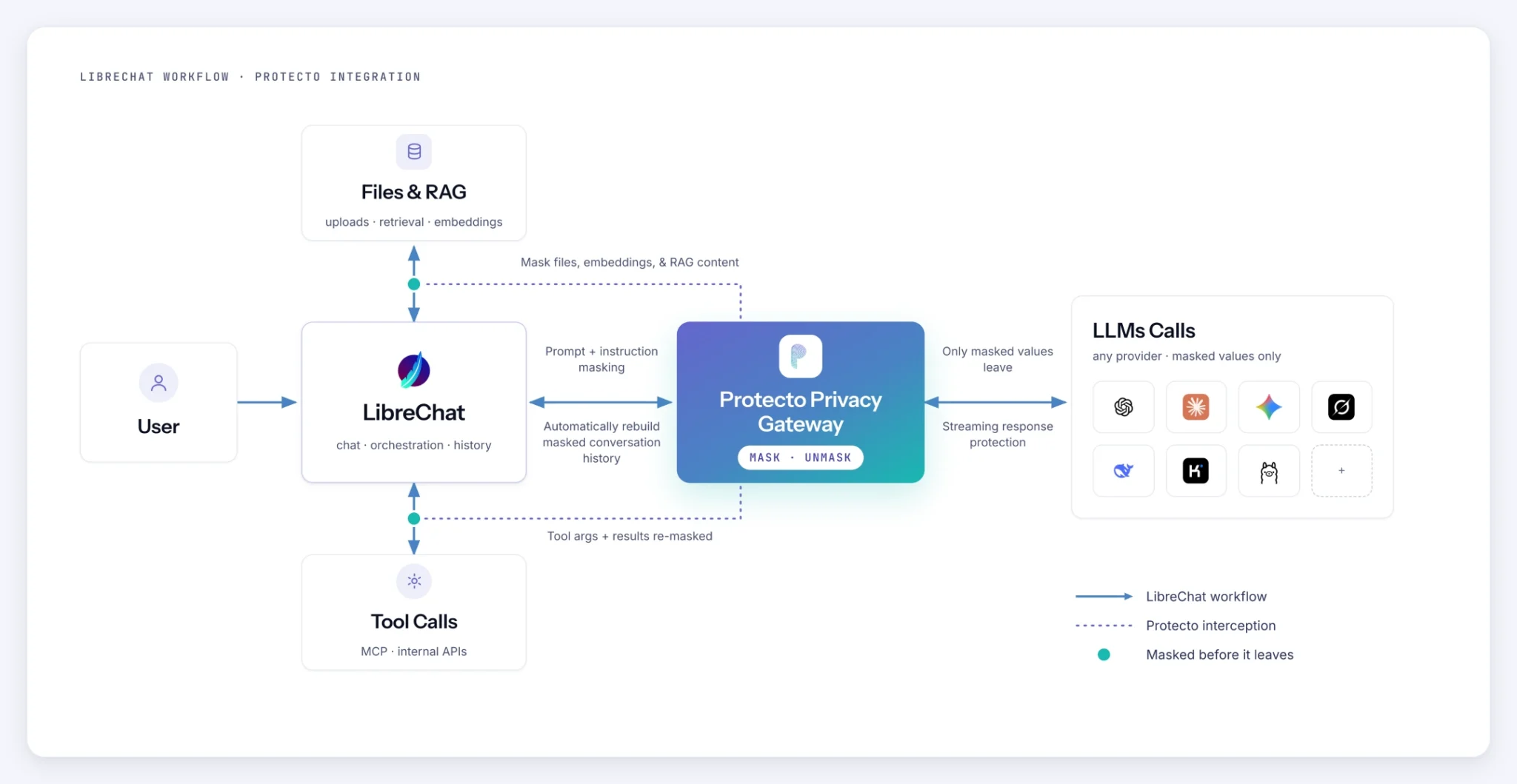
The Gateway is a stateless, OpenAI-compatible layer. LibreChat talks to it the same way it would talk to OpenAI directly, and the Gateway translates the protected conversation into the shape OpenAI or Gemini expects on the other side.
The Gateway keeps no conversation database of its own. LibreChat stores the conversation and masked replay information. On the next turn, the Gateway rebuilds protected history from a valid saved checkpoint and masks only new content, including new prompts and tool results. This avoids rescanning previously protected history.
The detection and masking engine underneath is Protecto Vault, the same one already running in production at existing Protecto customers. What’s new here is where it sits: inside a live chat session, resolving tool calls and unmasking a streamed response, rather than scanning a document that’s already at rest.
LibreChat is one of the interfaces the Gateway runs behind. The architecture and the rest of the model stack it works with are covered on the Privacy Gateway for AI Chat page. This post is specific to the LibreChat mechanics.
The four points where it acts
- Prompt in. Your message is masked before it reaches OpenAI, Anthropic, Gemini, Grok or any other SOTA model.
- Retrieved context in. Files and passages LibreChat pulls into the prompt are masked before they enter the model’s context.
- Tool call. Masked values are resolved so a tool call runs against real data, rather than a token no downstream system recognizes.
- Response out. The model’s reply is unmasked for you on the way back. The model never holds the real values at any point.
Point three is where most masking layers fail. It’s worth walking through in detail.
Masking a prompt, step by step
Every request LibreChat sends through the Gateway follows the same sequence.
- The Gateway validates the request: model routing, provider key, your Protecto configuration, and your identity.
- It rebuilds the protected conversation history from LibreChat’s own record of the prior turn, rather than trusting whatever clear text happens to be showing in the UI.
- It collects everything that needs masking for this turn: the current system, developer, and user text, any tool arguments LibreChat is replaying, and tool results if your deployment masks those too.
- It sends that batch to Protecto for masking. Small requests use a synchronous call. Larger ones, like a long uploaded document, are submitted asynchronously and polled until they’re done, so size doesn’t stall the request.
- Only after your content is masked does the Gateway add its own fixed system instruction. Your data is protected before anything else touches the prompt.
- The masked conversation is translated into the request format the selected provider expects, and sent.
On the way back, the Gateway watches the streamed response for masked values it needs to resolve. One it already has from earlier in the request gets swapped back in locally. Anything it hasn’t seen yet is resolved with a call to Protecto. Authorized users see restored values in the response. LibreChat stores the conversation along with masked replay information, allowing the Gateway to reconstruct protected context for the next turn.
Tool calls still resolve
This is the part a scan-and-redact control cannot do, and it’s the reason to build a gateway instead of a detector.
Say a support workflow inside LibreChat has a tool wired to a billing system. Someone asks the assistant to check the status of a specific invoice for a named customer. The model reasons over masked values, because that’s all it was ever given, and it calls the billing tool with the masked customer identifier. Before LibreChat or an MCP server runs that call, the Gateway sends the masked argument to Protecto for resolution and passes the tool the real one. The lookup runs against your actual customer record, not a token that matches nothing. When the tool returns a result, the Gateway masks it again before it goes back to the model for the next turn.
One limitation worth stating plainly. This is boundary resolution, authorized by a per-user Protecto token. It is not yet a policy decision made per tool or per field. Today, if a tagged value appears and the requesting user’s token permits unmasking, the Gateway resolves it. It doesn’t yet ask whether this specific tool, or this specific task, should be allowed to see this specific kind of value. That’s a real gap, on the roadmap rather than shipped, and worth knowing before you wire the Gateway into a tool that touches especially sensitive data.
Streaming adds one more constraint worth knowing if you’re debugging this yourself. A tool-calling turn has to stay a tool-calling turn from start to finish. It can’t look like an ordinary text answer partway through and then switch to a tool call, because LibreChat will treat the early text as the complete response and skip the tool entirely.
Retrieved context, embeddings, and files
LibreChat’s own retrieval pipeline handles document ingestion. Parsing, chunking, and storage happen there, not in the Gateway. That means the original file and its extracted text can still exist inside LibreChat and its retrieval services, outside the Gateway’s view. If full custody of the source document matters for your deployment, plan for that at the LibreChat and infrastructure level. Don’t assume the Gateway covers it end to end, because today it doesn’t.
What the Gateway does cover: when a retrieved chunk enters the prompt as system or developer context, it’s masked on the same terms as any other content, on every turn where that context is new or has changed. And if LibreChat is configured to call the Gateway’s embeddings endpoint, each embedding input is masked before it’s forwarded to OpenAI, and only the resulting vectors come back. A masking failure stops that call rather than letting anything unprotected through.
Two caveats worth stating plainly. Only one embedding model is supported today. And masking can shift the geometry of an embedding, which can affect retrieval ranking. We haven’t published a retrieval-quality number for that effect because we don’t have one we’d stand behind yet. If retrieval accuracy matters for your use case, test it against your own documents before you commit to a rollout.
Local OCR works the way you’d want it to. PDF and image text is extracted on your own infrastructure, nothing is sent to a network OCR service, and the Gateway keeps no copy of the document. The extracted text flows back into LibreChat and is protected the same way any other prompt content is, the next time it becomes part of a request.
What happens when something fails
The Gateway doesn’t have one global fail-open or fail-closed setting. Behavior depends on where the failure happens, and the honest answer is more useful than a simpler one that isn’t accurate.
Masking fails closed. If Protecto can’t be reached, or your configuration is wrong, the request stops before it reaches the model. Nothing gets sent unprotected, because the masking step never completed.
A missed detection is a different kind of failure, and every product in this category shares it. If the detector doesn’t flag a value, it passes through as clear text, because there’s no second system checking the first one’s work. That’s a real, residual risk. Point a proof of concept at your hardest data before trusting any vendor’s detection, including ours.
An unmasking failure is the safest of the three outcomes. If Protecto can’t resolve a value on the response path, the Gateway returns the masked version rather than guessing at the real one. A tool call downstream might get no match or the wrong result, but it won’t be handed data it shouldn’t see.
What this protects, and what it doesn’t
Privacy Gateway for AI Chat is designed to detect and mask supported entity-based sensitive data, including common personal, health, payment, account, government, and customer identifiers, before protected chat content reaches the model provider.
It doesn’t protect discount terms, legal strategy, internal risk analysis, compensation context, HR reasoning, confidential business narratives, unreleased intellectual property, or sensitivity created by combining otherwise ordinary facts. That’s a content-level problem, not an entity-detection one, and this integration isn’t built to solve it. If that’s the exposure you’re actually worried about inside LibreChat, raise it before you scope a deployment. It changes what you’re buying.
Built for LibreChat today
LibreChat is the integration we’ve built, tested, and shipped: the request headers, the streaming behavior, the tool-turn handling, and the history mechanism above are all specific to how LibreChat works. Other chat interfaces are protocol-compatible in principle, and we won’t claim they work until we’ve verified that end to end the same way. Running something else? Ask us. We’d rather scope that conversation honestly than have you find the gap in production.
If you’re deploying this for healthcare, financial services, or legal work specifically, there’s a second reason to run it behind a self-hosted interface like LibreChat instead of a hosted one. When a prompt goes straight to OpenAI or Gemini, the exposure isn’t only that one message. The whole session persists on the provider’s side: every earlier turn, the context built up across the conversation, details a user mentioned three questions back that you no longer control. With the Gateway behind LibreChat, that session stays on your infrastructure, and the provider only ever holds masked values. For a regulated workload, that’s often the harder requirement to satisfy, not the prompt-level masking by itself.
Where this leaves you
None of this requires you to change how your team uses LibreChat. The Gateway sits in the request path once, and it covers every model you connect behind it, including ones you add later. Your prompts, your tool calls, and your retrieved context get masked before a model provider sees them, and you get real answers back.

