
A Technical blog series on where sensitive data moves in an AI workflow, what decisions Protecto makes at each point, and what enterprises get from enforcing policy once instead of everywhere.
Contents
Introduction The Six Places Enterprise AI Touches Sensitive Data
Pattern 3 · AI Gateway Every Team Is Calling an LLM. One Policy Should Govern All of It: Protecto at the AI Gateway ← You are here
Pattern 4 · MCP Gateway Your Agents’ Tools See More Than Your Agents Do: Protecto as the MCP Gateway
Pattern 5 · Agent Gateway When One Agent Hands a Case to Another: Protecto as the Agent Gateway
Pattern 6 · RAG PipelineThe Archive That Answers Back: Protecto in the RAG Pipeline
Every Team Is Calling an LLM. One Policy Should Govern All of It: Protecto at the AI Gateway
A year ago, one team at your company called an LLM. Today it’s every team: a support chatbot, a sales copilot, a document summarizer, and a handful of features nobody in security has heard of yet. Each one sends prompts full of whatever data the team put in them, to whichever model provider the team picked. This article shows what changes when Protecto sits at the AI gateway those calls already pass through, and why the biggest win is a word that sounds boring until you need it: uniformity.
Part of a series on the six places Protecto fits into an AI workflow. Each article stands alone: a real-world style use case, where Protecto sits, what changes, and what the business gets out of it.
The situation
Picture a mid-size company eighteen months into its AI rollout. The platform team did the sensible thing early: they stood up an AI gateway, a single service that routes all LLM traffic to the model providers. The gateway tracks cost per team, enforces rate limits, and lets the company switch providers without every team rewriting code. Every prompt to every model, from every application, flows through it.
What the gateway doesn’t do is look inside the traffic. The support chatbot sends full customer conversations, names, account numbers, and complaint history included. The sales copilot sends CRM records with deal values and contact details. The summarizer sends whole documents, and nobody reads a document before sending it to be summarized; sending it unread is the point. Each prompt leaves the company and lands on a model provider’s infrastructure exactly as the application composed it.
Multiply that by every team and every provider, and the company’s real exposure isn’t any single application. It’s the aggregate: a high volume of prompts a day, each a small act of data sharing that no one reviews, going to external services under terms that vary by provider. In our experience this flow tends to grow faster than the process for reviewing it, because shipping a prompt requires no data-sharing approval the way shipping an integration once did. When security asks “what customer data leaves us through LLM calls?”, the honest answer is often “whatever any team ever put in a prompt.” Nobody decided that; it accumulated one feature at a time.
Why per-team fixes don’t hold
The first instinct is to make each team responsible: publish guidelines, ask teams to scrub prompts before sending. Some teams do it well. Some do it partially. The team that shipped last quarter under deadline didn’t do it at all, and their feature works, so nobody looks. Prompt hygiene enforced by guideline has the same failure mode as any control that depends on every team doing extra work forever: it erodes.
There’s also a subtler problem. Even a diligent team can only scrub what it recognizes, and prompts carry sensitive data in forms no simple pattern check catches: a name inside a pasted email thread, an account number in a screenshot transcript, a medical detail in a complaint. Scrubbing done twelve different ways in twelve codebases produces twelve different levels of protection, and the company’s effective protection is whichever one is weakest.
What changes with Protecto
The AI gateway is already the one point every model call passes through. Attaching Protecto there turns it from a traffic manager into a policy point: every prompt is inspected on the way out, and every response on the way in, under one set of rules the security team owns.
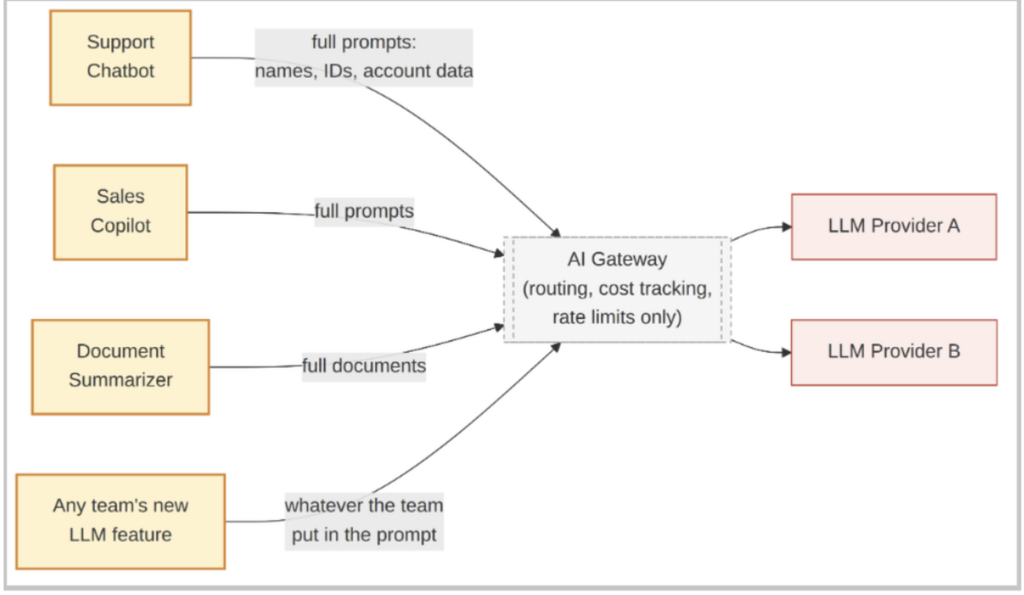
Without a policy layer: every application’s full prompts flow to model providers unchanged
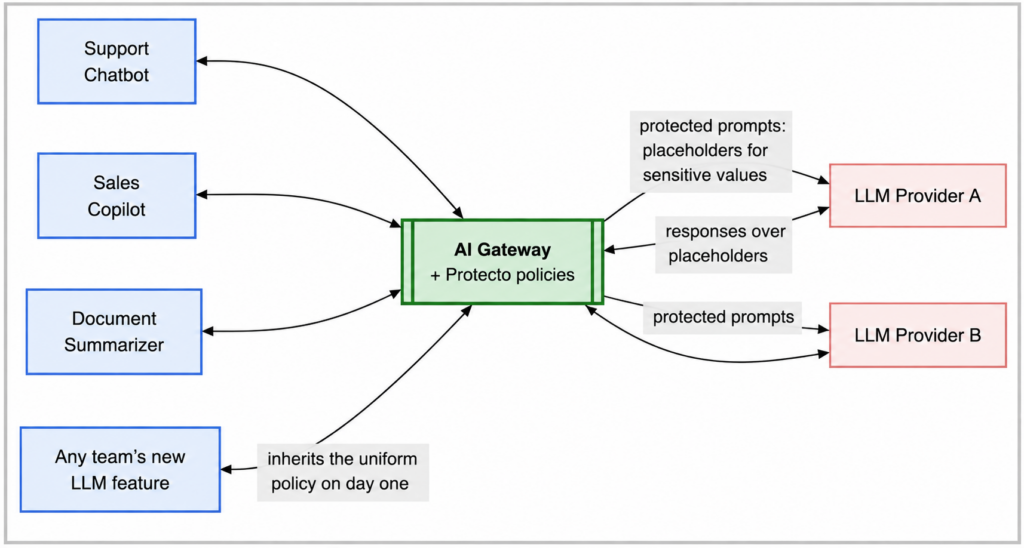
With Protecto at the AI gateway: providers receive protected prompts; applications get responses restored per their policy
The decisions, concretely
Take one prompt the support chatbot sends. A customer asked why their payment failed, and the application includes the customer record for context:
Summarize this case for the agent: Dana Whitfield, dana.w@email.com, account #77-2141, card ending 8802, called about a failed $1,450 payment. Previous complaint in June about a billing error. Prefers evening callbacks.
Here’s what the model provider actually receives after the gateway applies policy:
Summarize this case for the agent: [NAME_5f21], [EMAIL_88c3], account [ACCT_19ad], card ending 8802, called about a failed $1,450 payment. Previous complaint in June about a billing error. Prefers evening callbacks.
The model gets everything it needs to do the job: the amounts, the history, the callback preference, and a consistent placeholder wherever an identity appears. It writes a perfectly useful summary about [NAME_5f21]. For this text prompt, on this path, the provider receives placeholders rather than the customer’s name, email, or account number.
That last sentence is deliberately scoped, because the strength of the claim depends entirely on coverage. A gateway protects the content paths it actually inspects. Sensitive data can also travel as file attachments, images, audio, and other non-text payloads; inside tool results and retrieved context that the application assembles; in retries and fallback calls; and through the observability stack that logs requests alongside the gateway. And any application that calls a provider directly, bypassing the gateway, is outside the policy entirely.
Getting to a defensible “what leaves us” answer means enumerating those paths, deciding which are in scope, and enforcing at the network layer that the gateway is the only route out. Detection is also not perfect; policy should assume some residual risk rather than assume none.
Then the response comes back through the gateway, and a second decision happens: what gets restored, and for whom. The support chatbot serves a verified support agent whose policy permits seeing customer names, so the gateway unmasks “Dana Whitfield” in the summary the agent reads. The analytics pipeline that consumes the same conversations for trend reports has a different policy; it receives the summary with placeholders intact, because trend analysis needs patterns, not people. Unmasking isn’t a privilege the application owns. It is controlled by policies defined for the user and the task. Protecto applies the appropriate policy, ensuring that each destination receives only the level of access to sensitive data it needs.
One more decision worth seeing: the summarizer team uploads a document that turns out to contain employee health records. This company’s policy treats that category as blocked for external model calls, so the prompt doesn’t go out masked; it doesn’t go out at all, and the team finds out why. Note that this is a policy choice about a specific data class, not a blanket rule about anything health-related.
The same organization may well permit a de-identified clinical narrative to reach a model where a business task requires it, as the in-agent article in this series describes. The value here isn’t that one answer is right; it’s that the answer is written down once and applied to every team’s traffic, instead of being decided independently inside each application.
What customers get
“Uniform policy” is the customer advantage this pattern is really selling, and it’s worth spelling out what it buys:
| Advantage | What it means in practice |
| One rulebook, every model call | The same definition of “sensitive” applies to the chatbot, the copilot, the summarizer, and the feature that ships next month. No weakest-link team |
| Provider-agnostic protection | Policies live at the gateway, not in provider-specific code. Switch from Provider A to Provider B, or add a third, and the same protection applies on day one |
| Coverage for AI you don’t know about yet | Any application that routes through the gateway is covered, including features security never reviewed. Protection stops depending on knowing every project |
| One answer for auditors | “What leaves us through LLM calls, and to whom?” becomes a policy lookup and a log review at a single point, not an interview tour of every team |
| Consistent placeholders where workflows need them | The same customer maps to the same placeholder across calls within an approved workflow, so multi-step processes keep working. That consistency is deliberately scoped; it isn’t shared universally across every application and environment |
What this doesn’t do
The AI gateway sees model traffic and only model traffic. It doesn’t govern what an agent stores in its own memory, what flows between agents, what tool and MCP calls carry, or what a retrieval pipeline pulls into context. Those are separate enforcement points, covered elsewhere in this series, and mature deployments typically combine two or three of them. Policy evaluation also adds a step to every model call, which has a latency cost worth measuring for your traffic. And the gateway pattern assumes the traffic actually routes through the gateway; an application that calls a provider directly bypasses everything, so this pattern works best alongside network rules that make the gateway the only road out.
When this pattern is the right one
Start here when LLM usage has spread across many teams and the question keeping security up at night is “what’s leaving the company in prompts?” It can be one of the fastest patterns to put in place when an AI gateway is already deployed, because the enforcement point exists and the applications don’t change. It’s also the right pattern when model flexibility matters: companies that expect to switch or mix providers get protection that travels with the traffic instead of living in any provider integration.
Look at other patterns when the sensitive flow isn’t model traffic: protection inside a specific high-stakes agent’s workflow, policy on shared internal APIs at the API gateway, or controls on tool calls at the MCP gateway.
