A Technical blog series on where sensitive data moves in an AI workflow, what decisions Protecto makes at each point, and what enterprises get from enforcing policy once instead of everywhere.
Contents
Introduction The Six Places Enterprise AI Touches Sensitive Data
Pattern 4 · MCP Gateway Your Agents’ Tools See More Than Your Agents Do: Protecto as the MCP Gateway ← You are here
Pattern 5 · Agent Gateway When One Agent Hands a Case to Another: Protecto as the Agent Gateway
Pattern 6 · RAG PipelineThe Archive That Answers Back: Protecto in the RAG Pipeline
Your Agents’ Tools See More Than Your Agents Do: Protecto as the MCP Gateway
Prompts get the security attention. Tool calls often don’t, and they carry data in both directions: agents reaching into the CRM, the ticketing system, and vendor data services through MCP servers, sending real identifiers out and pulling whole records back. This article shows what changes when Protecto enforces data policy at the MCP gateway, and why the tool boundary deserves the same scrutiny the model call gets.
Part of a series on the six places Protecto fits into an AI workflow. Each article stands alone: a real-world style use case, where Protecto sits, what changes, and what the business gets out of it.
The situation
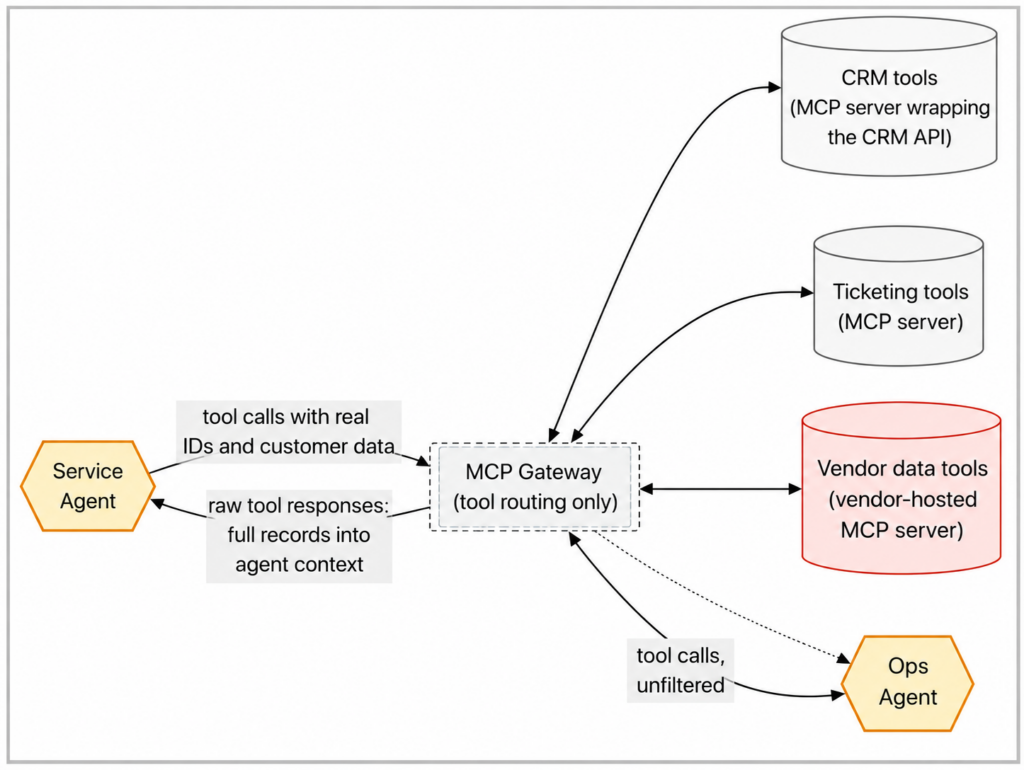
Picture a company that adopted MCP, the open standard that lets AI agents use tools, to connect its agents to real systems. The setup is typical: an MCP server wraps the CRM’s API and exposes it as tools like “look up customer” and “update record.” Another wraps the internal ticketing system. A third is hosted by a data vendor and offers verification and enrichment tools. A service agent and an ops agent use these tools all day, and the tool catalog grows every month because that’s the whole appeal of MCP: adding a capability is as easy as adding a server.
Now follow one tool call. The service agent needs a customer’s account status, so it calls the CRM lookup tool. The request goes out carrying a real customer ID. The response comes back carrying the full CRM record: contact details, government ID on file, payment history, and the notes field where someone once typed things nobody should retype. All of it lands in the agent’s context, which means all of it flows onward to the LLM, into the agent’s memory, and into logs.
Two exposures, one call. Outbound, real identifiers travel to tools, including a vendor-hosted server whose logging and retention the company doesn’t control. Inbound, tool responses dump entire records into agent context, and the agent has no way to know which fields in that response are sensitive. The MCP server was built to expose the API faithfully, and the agent was built to use whatever it receives. Nobody in that chain is responsible for minimizing the data, so nobody does.
Why the obvious fixes fall short
Fixing the tools means rewriting every MCP server to return less, including the vendor’s, which isn’t yours to rewrite. It also breaks the servers’ other consumers, because the CRM wrapper serves human-facing applications too, and those may legitimately need fuller records.
Fixing the agents means teaching every agent which fields in every tool’s response are sensitive. That knowledge doesn’t exist anywhere today, and it changes each time a tool’s response format changes or a new server joins the catalog. An agent fleet times a growing tool catalog is exactly the many-times-many maintenance problem that never gets finished.
The stable point in this picture is a gateway: a single connection point agents use to reach their MCP servers, so traffic in both directions flows through one place that can make data decisions.
Worth being precise here, because this is an architectural choice rather than something MCP gives you. The protocol does not require a gateway, and its authorization framework is optional; many deployments run servers over stdio as local subprocesses that pick up credentials from their own environment, with no central chokepoint and no propagated user identity at all.
So this pattern assumes a deployment where you have deliberately centralized tool traffic, and it depends on three things you have to build: a workload identity for each calling agent, propagation of the end user’s identity alongside it so policy can be evaluated for a real person and task, and network or platform controls that prevent agents from reaching MCP servers directly and bypassing the gateway. Without the third, the pattern protects the calls that happen to route through it and nothing else. The MCP authorization specification is the reference point for how identity is expected to travel:
What changes with Protecto
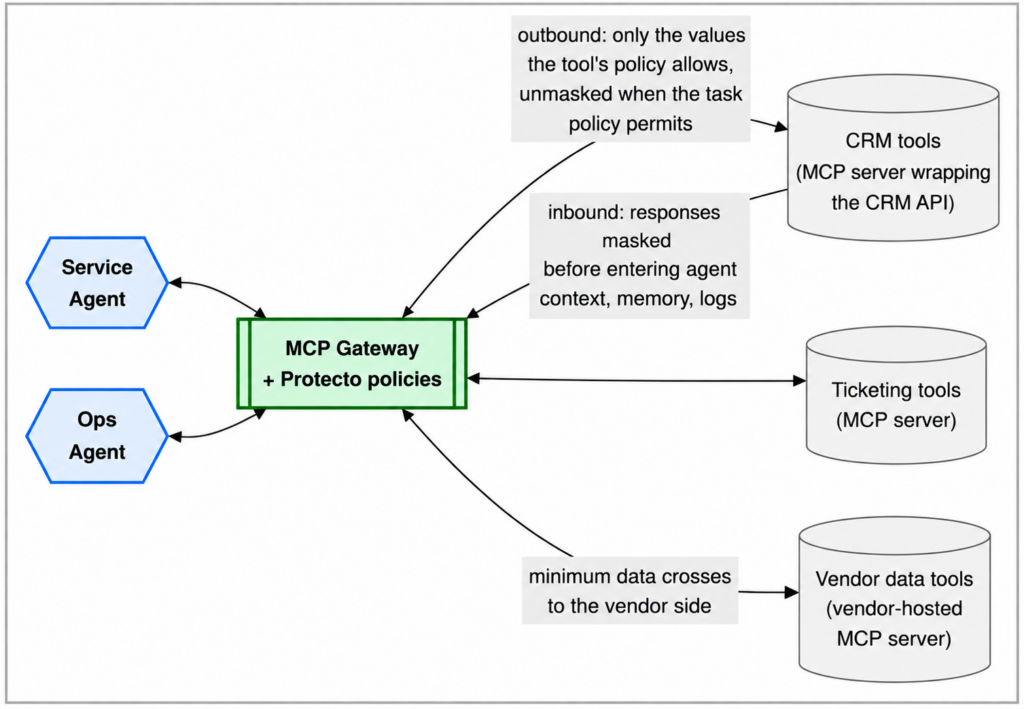
With Protecto at the MCP gateway, each tool call that routes through it is evaluated twice: the arguments on the way out, and the response on the way in. The rules live in one place and cover the whole catalog, so an agent’s protection doesn’t depend on which tool it happens to call.
The decisions, concretely
The service agent is helping a customer and calls the CRM lookup tool. Inside the agent, the customer is already a placeholder, [CUST_3e97], because the agent’s context was protected upstream. Here’s the outbound decision:
Agent's tool call: look up customer [CUST_3e97], fields: account status, open invoices

What the CRM tool receives: look up customer C-118276, fields: account status, open invoices
The CRM API can’t look up a placeholder, so the gateway unmasks the ID for this call. Unmasking isn’t a privilege the agent owns. It is controlled by policies defined for the user and the task, and Protecto applies the appropriate policy, ensuring each agent receives only the level of access to sensitive data it needs. The same policy that unmasked the customer ID for the CRM tool declines to send it to the vendor’s enrichment tool, because the rule for vendor-hosted tools is stricter: minimum data crosses to systems the company doesn’t control.
Now the inbound decision. The CRM answers with everything it knows:
What the CRM returns: Dana Whitfield · dana.w@email.com · SSN 543-88-1201 · account C-118276 · status: active, 2 open invoices, $1,450 overdue · notes: "Disputed a charge in June. Spouse called once about the account."

What reaches the agent: [NAME_5f21] · [EMAIL_88c3] · SSN [SSN_c419] · account [CUST_3e97] · status: active, 2 open invoices, $1,450 overdue · notes: "Disputed a charge in June. [Family detail removed per policy]"
The agent gets what the task needs: the status, the invoices, the dispute history. The identifiers come back as the same placeholders the agent already had, so its reasoning stays connected. The SSN never enters agent context at all. And the stray personal detail in the notes field, the kind of thing no field-level API permission can catch because it lives inside free text, is caught and removed by policy.
The ops agent calling the same tool for a system-maintenance task gets a different rendering under its own policy: account and status fields only, no name, no contact details, no notes. Same tool, same record, two agents, two answers, each defensible.
What customers get
| Advantage | What it means in practice |
| One policy for the whole tool catalog | Tool calls routed through the gateway are governed by the same rules regardless of which agent made them. A new MCP server added to the catalog inherits them on day one |
| Protection where agents are blind | Agents can’t tell what’s sensitive inside a tool response. The gateway decides so agents don’t have to, including for free-text fields |
| Minimum data to vendor tools | Vendor-hosted servers receive only what the task’s policy allows, which shrinks what third parties can log or retain |
| Both directions covered | Outbound arguments and inbound responses are each evaluated. Inbound is the direction teams most often overlook, because nobody chose what the tool would return |
| One audit point for tool traffic | “Which agents accessed customer records through which tools?” becomes a question the gateway can answer |
What this doesn’t do
The gateway governs what crosses it, which makes bypass the first thing to close: an agent that can open a direct connection to an MCP server, or launch one as a local subprocess, is outside the policy entirely, so this pattern is only as strong as the controls that force traffic through it. It also depends on trustworthy identity: if the calling agent’s workload identity or the end user’s identity doesn’t reach the gateway, policy has nothing specific to evaluate against.
Beyond that, it can’t control what a vendor’s system retains on its own side once data legitimately arrives there, and it doesn’t govern agent memory, agent-to-agent handoffs, or direct model calls; those have their own enforcement points, covered elsewhere in this series. Managing credentials for the underlying tool APIs is a gateway-layer concern in this architecture, and how it’s handled depends on the deployment.
Policy evaluation adds latency to every tool call, which matters more here than anywhere else in the stack, because agents make many tool calls per task. And per-tool policies require knowing what each tool actually needs, which is real setup work for a large catalog, even if it’s work you do once instead of once per agent.
When this pattern is the right one
Start here when agents use a growing catalog of tools, especially tools that wrap vendor APIs or return rich records, and when your security review of “what can this agent access?” keeps turning into “whatever its tools return.” The MCP gateway is the one point that scales with the catalog instead of with the agent count.
Look elsewhere when the sensitive flow isn’t tool traffic: the AI gateway pattern governs prompts to model providers, the API gateway pattern governs shared internal APIs with many kinds of callers, and in-agent integration protects a single agent’s own reasoning, memory, and logs.