
PDF data masking is the security step most document AI stacks skip. Most companies building RAG pipelines, agentic workflows, or document intelligence systems have secured the model, the vector store, and the API. They haven’t secured the step before any of that: the data inside the document itself, before it enters the pipeline. That gap shows up everywhere documents meet AI.
RAG pipelines ingest contracts, claims, and support tickets whole, PII included, because masking was never part of the ingestion step. The retriever surfaces those chunks to a model or a user exactly as they were written, PII and all.
Agentic workflows carry that same PII into agent memory and tool calls, where it persists across turns and reasoning steps. An agent that reads a contract once can keep referencing the names, account numbers, and terms in it for the rest of the session, long after the original document has left the conversation.
Document intelligence systems extract structured data from unstructured files without ever asking whether the extracted fields are sensitive. A pipeline built to pull invoice totals or claim numbers doesn’t stop to check whether it also just pulled a patient name or a salary figure into a downstream database.
Fine-tuning and training pipelines bake whatever was in the source documents into the model weights. Unlike a RAG chunk or an agent’s memory, you can’t just delete it, undoing it means rolling back to an earlier checkpoint or retraining from cleaned data, which few teams can afford to do on demand. Each of these treats document masking as someone else’s problem. In practice, it’s usually no one’s.
Why PDF data masking is harder than text masking
Most PII protection tooling was built for structured or semi-structured text: a database column, a JSON field, a chat message. A PDF is neither. It’s a rendering format, not a data format. The same sentence can be split across multiple text runs, tables can be represented as loose positioned characters with no underlying grid, and a scanned contract has no extractable text at all until OCR runs first.
That matters because detection accuracy on a PDF depends on how well the document’s layout is reconstructed before an entity detector ever sees the text. Get the extraction wrong, and you either miss entities that were split across lines, or you mask table cells and headers you didn’t need to touch, degrading the document for no security benefit.
What this looks like on a real document
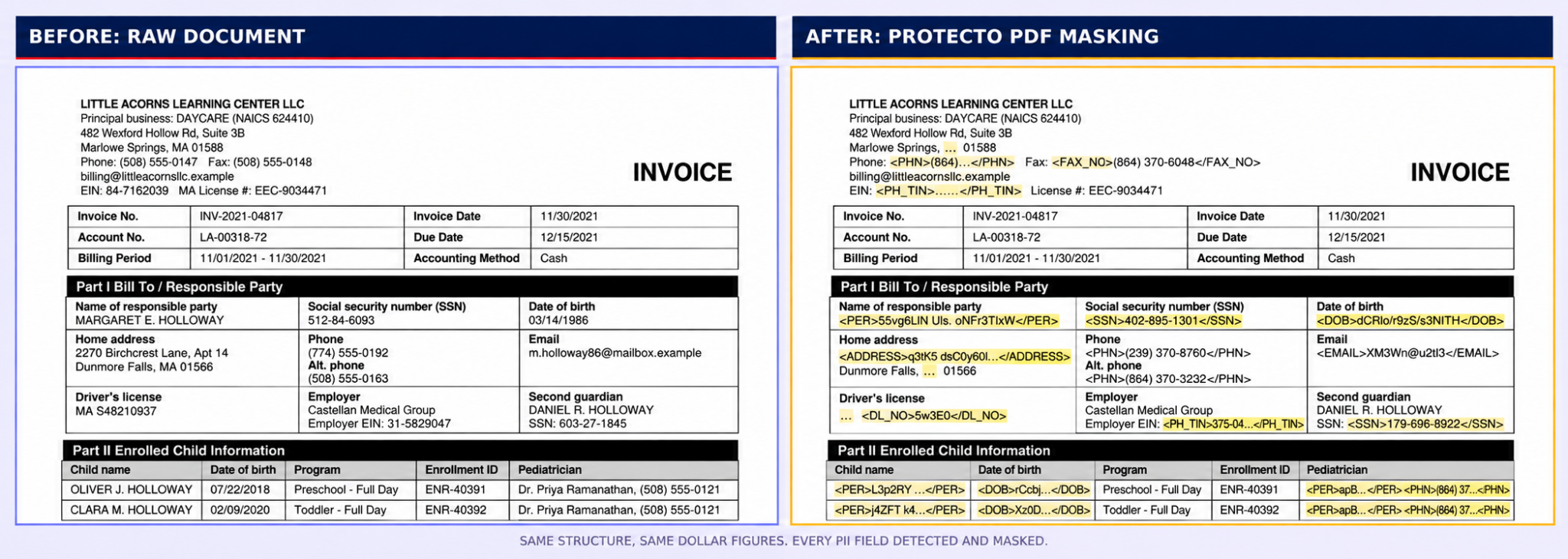
Here’s an actual before-and-after, run through Protecto PDF Masking. It’s a synthetic invoice, but the structure is real: a billing table, a bill-to section, payment details, an authorization block. Every PII field, the responsible party’s name, SSN, date of birth, home address, phone, email, driver’s license, employer EIN, the second guardian’s SSN, card and bank account numbers, is detected and masked in place, typed by entity kind. The invoice line items, dollar amounts, invoice number, and billing period are untouched, because they were never PII to begin with.
That’s the difference between context-preserving masking and blind redaction. The document is still a usable, computable invoice afterward, structure and business data intact, just with the sensitive fields gone.
Where PDF data masking fits in the pipeline
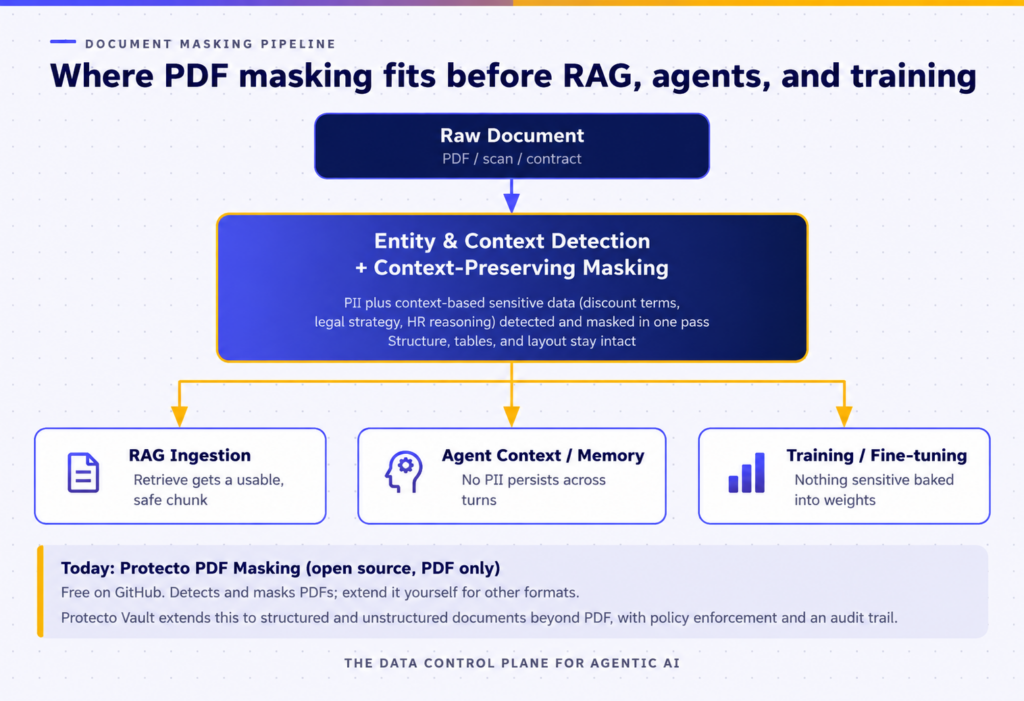
Masking has to happen once, at the document layer, before the document forks into any of these three destinations. Handling it separately in the RAG pipeline, the agent framework, and the training data prep script means three implementations to maintain and three places for PII to slip through.
Open-source PDF processing, with your choice of masking engine
Protecto has open-sourced the document-processing layer of its PDF masking workflow.
Protecto has open-sourced the document-processing layer of its PDF masking workflow. Protecto PDF Masking extracts content from PDFs, preserves document structure and layout, and reconstructs a usable PDF after sensitive values have been replaced.
Sensitive-data detection and masking are provided through Protecto Vault, Protecto’s commercial platform. Protecto Vault identifies PII and context-sensitive business information, generates consistent replacements, and provides policy control over access to original values.
Using Protecto Vault is not required to use the open-source PDF processing project. Teams can connect the project to their own detection and masking systems, or to another provider, and use the open-source PDF layer to process and reconstruct the document.
The current open-source project is deliberately scoped to PDFs. Teams that need to process Word documents, spreadsheets, images, or other formats will need to build or integrate the corresponding document-processing components.
| Category | Available today |
| Open-source component | PDF extraction, document processing, and reconstruction |
| Document format | |
| Sensitive-data detection | Protecto Vault supports PII, PHI, PCI and other entities (full list of entities here)
or your own detection system |
| Masking approach | Protecto Vault offers Context-preserving, structure and layout stay intact.
or your own masking system |
That’s a deliberately honest scope. A tool that claims to mask everything on day one usually means it masks nothing well. Starting with PDFs, the format most document-AI pipelines actually run into first, and being upfront that other formats are an extension point rather than a shipped feature, is a more useful answer than overselling it.
Why “just detect PII” isn’t the whole job
Detecting PII in a document is the first step, not the last one. What happens after detection is where most homegrown approaches fall short: masking the same entity inconsistently across a document, so a person’s name maps to three different placeholders on three different pages, or masking so aggressively that the retriever or model has nothing coherent left to work with.
Consistency alone is a harder problem than it sounds. If the same customer’s name shows up across twenty support tickets that all get chunked into a RAG index, and each ticket masks that name to a different placeholder, the retriever has no way to recognize those twenty chunks belong to the same person. That breaks exactly the kind of contextual retrieval RAG is supposed to enable. Getting masking right means the placeholder for a given entity has to stay stable across documents and sessions, not just within a single file.
FAQs:
- Why is masking PDFs harder than masking plain text?
PDFs are a rendering format, not a data format, text can split across lines and tables have no real grid. Get the layout wrong before detection runs, and you either miss entities or mask things you didn’t need to. - What’s the difference between context-preserving masking and blind redaction?
Blind redaction just blacks things out. Context-preserving masking replaces each entity with a typed placeholder while keeping the document’s structure and non-sensitive data intact, so it’s still usable afterward. - Is Protecto PDF Masking free, and what does it cover?
The document processing part is free. You can use your own masking tool and need Protecto Vault to detect and mask PII and context-based sensitive data, but this doesn’t include policy enforcement, unmasking, or an audit trail. - Does masking documents hurt model accuracy?
Sometimes. Masked training data can perform slightly worse than raw text, but that cost is almost always smaller than the cost of a model leaking real PII
