Data leaks and compliance risks are two major concerns for teams building AI agents. AI agents need real data to do real work. A support agent needs a customer’s email to open a ticket. A finance agent needs an account number to look up a balance. But the model rarely needs those real values.
When teams can’t see where sensitive data goes or control who receives it, they often restrict agents’ access to enterprise data. Protecto’s LiteLLM data protection gives teams control over a simple question: Who sees which value, and at which step?
Why typical guardrails fall short for agents
LiteLLM supports configurable guardrails, such as open-source Presidio, that find sensitive data and mask it or stop the request. They help, but they were not built for agents. Two problems show up:
- They can hurt meaning. Basic masking replaces a value with a generic label such as [PERSON]. When two customers appear in the same request, the model can no longer tell them apart, so it can mix them up or hallucinate.
- They mask everything, but agents need real data at some steps. A ticket tool needs the real name and email to create the ticket. A blanket rule either exposes the data or breaks the workflow. Agents need policy-based control, not a yes-or-no mask.
How Protecto solves this
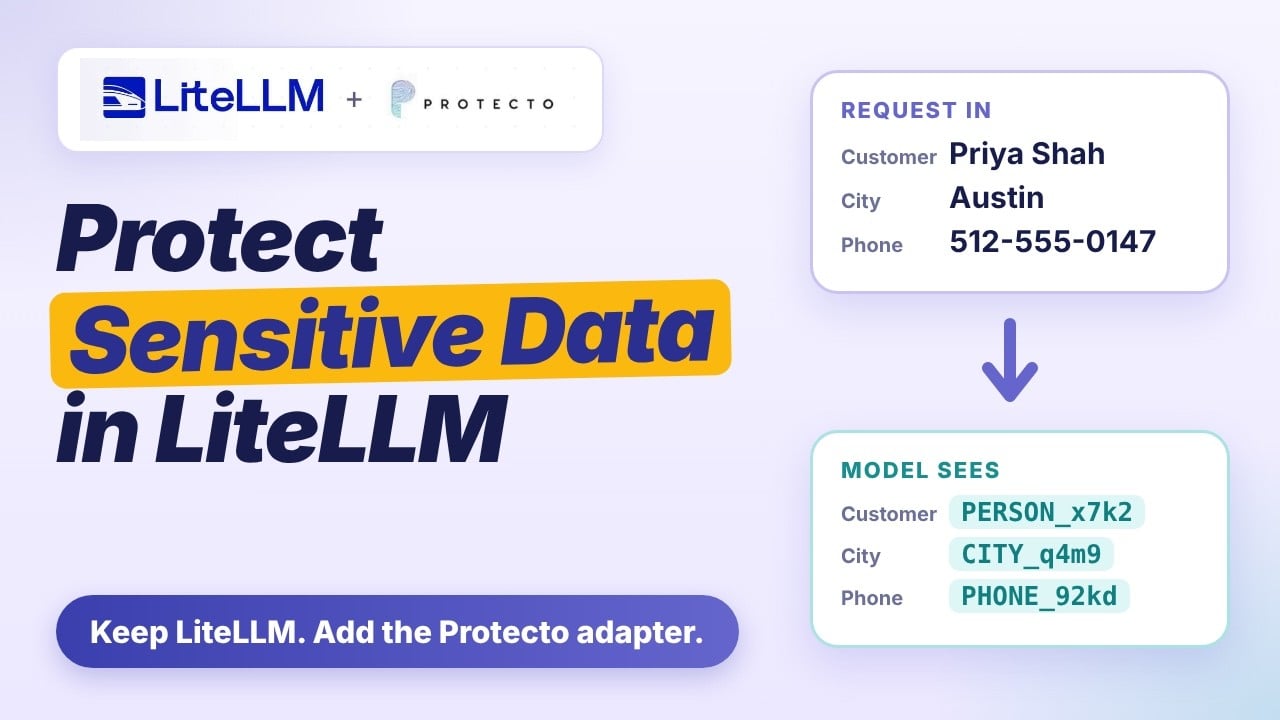
Protecto is the data security layer for the agentic AI era. It integrates with LiteLLM, the gateway you already run, as an adapter (the Protecto adapter) that keeps context and follows your policy.
- It keeps context. Protecto replaces each sensitive value with a consistent, typed token, so the model can still tell who is who and answers stay accurate.
- It is decided by policy. Your policy decides what is masked and what each tool and the user can see, field by field. The ticket tool receives the name and email, the issue description stays masked, and the final answer follows the user’s own policy.
LiteLLM keeps handling access and routing. This post shows how Protecto’s LiteLLM integration works inside LiteLLM.
Why the gateway is the right place
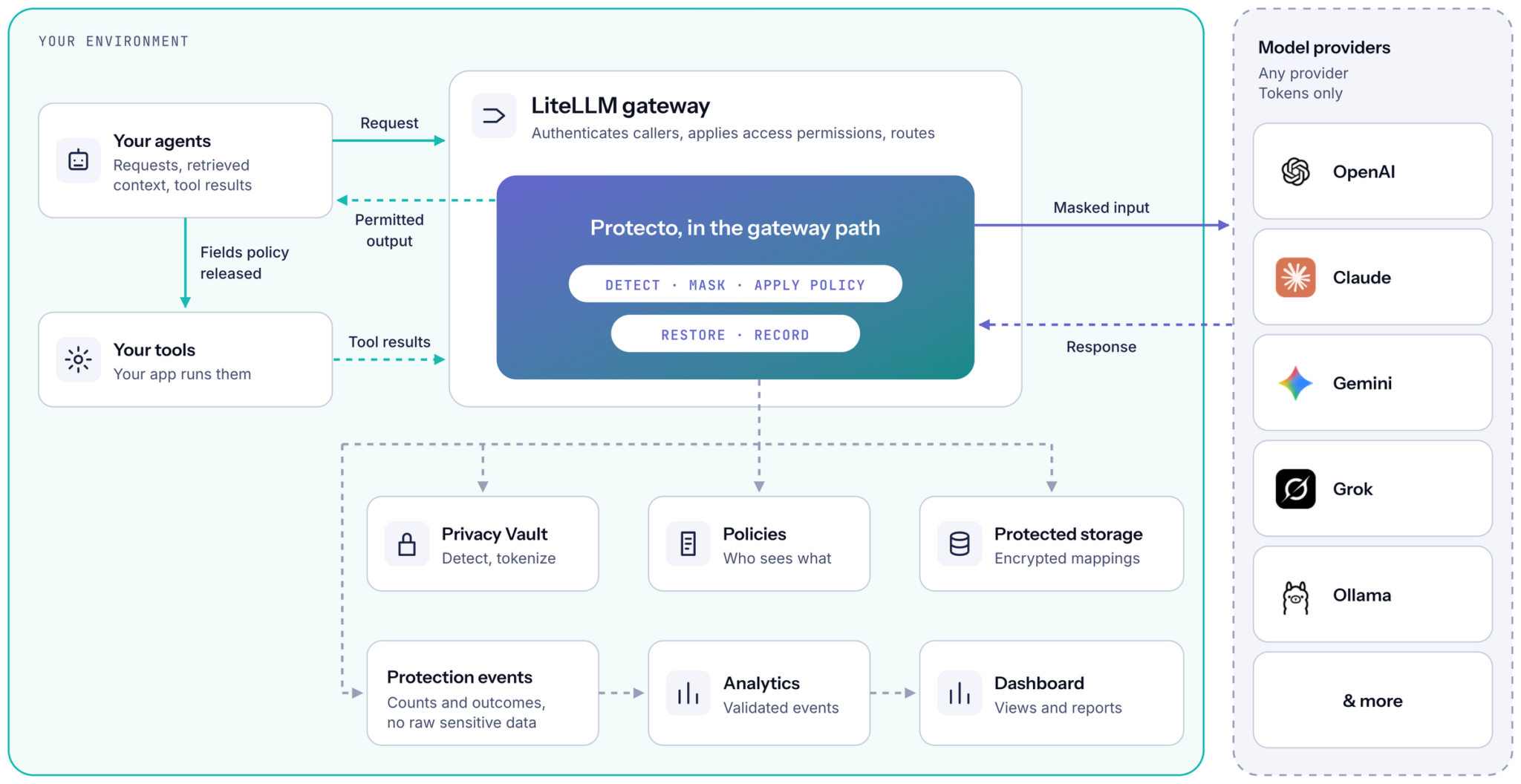
Without a gateway, protection often ends up built separately for each application. With one, model traffic passes through a single point, so you apply protection once. LiteLLM provides a common gateway endpoint for model calls, with centralized management of provider credentials, access keys, budgets and monitoring, and it authenticates the caller, applies model and tool access permissions and routes requests. Protecto’s adapter works inside that flow and does not replace any of it.
How one request moves through
Take a user who asks an assistant to create a support ticket using a customer’s name and email.
- The gateway establishes who is calling. Protection decisions use the validated user and team context, not identity claims inside the prompt.
- The adapter picks the policy. Exactly one active chat policy must match; if none or several match, the call is blocked.
- Sensitive data becomes tokens. Before the request goes to the model provider, the name and email in supported text are replaced with tokens. The model receives the masked content it needs to do the task.
- The model proposes a tool call. The call uses tokens. Before it returns to the application, the adapter checks the tool’s policy.
- Policy releases only approved fields. A support-ticket tool can receive the name and email, while sensitive text in the issue description stays masked.
- Results come back masked. When the application sends the ticket result back to the model, supported sensitive text is masked again, and the final answer is restored under the user’s chat policy.
Two separate decisions
Input masking and output visibility are different decisions. A policy can let a support application show an email address in the final answer while the model still only ever processes a token. A tool policy takes precedence over the chat policy for tool arguments, and explicit deny or keep-masked rules win. If a policy is ambiguous, policy data is unavailable or a tool is undeclared, the release is blocked rather than guessed.
What the dashboard shows
The dashboard turns recorded protection activity into six views: Overview, Models, Agents & Tools, Data Protection, Policies and Reports. You can filter recorded activity by 7-day or 30-day windows, model, application or agent, tool and policy, inspect a request’s recorded events, and export CSV and HTML reports that include metric explanations and show whether the data is live, demo or combined. Raw prompts, original values and token mappings are excluded from the analytics data.
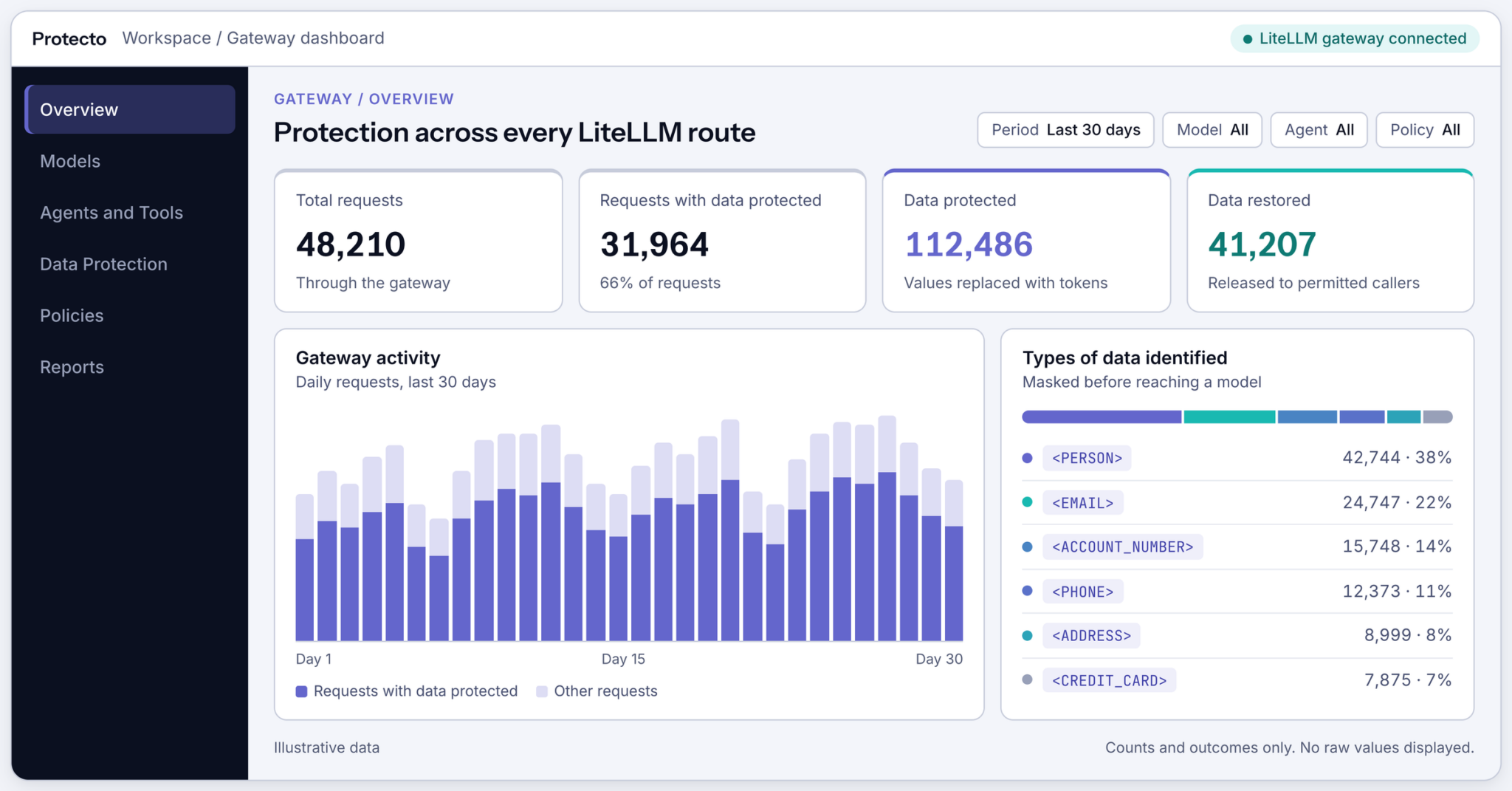
Three cautions apply. Reporting can lag behind enforcement, and a missing dashboard record on its own does not show that protection was bypassed. The totals reflect correlated chat activity and tool-argument release; they do not establish Responses, embeddings or direct MCP activity. And activity is attributed to an application or service, not automatically to an individual named agent. The dashboard is operational evidence of recorded behavior, not a guarantee of every external disclosure.
What it covers, and what it does not
The integration protects supported text that crosses the configured gateway hooks: conversation messages, retrieved passages, tool results your app sends back through LiteLLM, tool arguments released by policy, text generation through the Responses interface and text supplied for embeddings. It does not automatically protect provider-hosted retrieval, opaque files, images, audio or content fetched outside the gateway path, and it rejects unsupported payloads instead of treating them as protected. Direct MCP calls through LiteLLM keep LiteLLM’s access controls, but Protecto does not intercept those calls.
Design notes before you adopt it
- Protected-context storage: request-context restoration requires it. Remote restoration is a separate mechanism and does not provide the same request-bound guarantee, and a remote fallback can also occur with storage enabled. When storage is enabled, stored mappings are encrypted and scoped to the authenticated application, user and team context, and pinned chat-policy revision.
- Streaming: the adapter buffers partial tokens and tool arguments until they can be handled safely, so your application must support that delayed release.
- Embeddings: masking changes the text that gets embedded, so indexing and queries need a consistent approach, and retrieval quality should be evaluated.
Where it runs and what is certified
Protecto can run on premises or in your private cloud. When deployed in your environment and configured on supported traffic paths, Protecto replaces detected sensitive values with tokens before sending them to the model provider. Coverage depends on the payload, detection and policy configuration. Protecto can identify 200+ sensitive data types.
Protecto reports a SOC 2 Type II attestation and an ISO 27001 certification, and offers HIPAA support and a BAA. Confirm the scope and applicability for your deployment with Protecto.
FAQ
What is LiteLLM data protection?
It is the layer that decides what sensitive data may travel inside model requests. LiteLLM authenticates callers and routes requests, and Protecto works as an adapter (the Protecto adapter) inside that flow. It replaces sensitive data with tokens before the request reaches the model provider.
Is this another gateway?
No. LiteLLM keeps authenticating callers and routing requests; Protecto works as an adapter (the Protecto adapter) inside that flow.
What does the Protecto integration for LiteLLM cover?
It protects supported text that crosses the configured gateway hooks: conversation messages, retrieved passages, tool results your app sends back through LiteLLM, tool arguments released by policy, Responses text, and text supplied for embeddings. It does not automatically protect images, audio, opaque files, provider-hosted retrieval, content fetched outside the gateway path, or direct MCP traffic.
Can tools still receive real values?
Yes, where policy allows, field by field. An explicit tool rule takes precedence over the chat policy.
Do I need to rebuild agents that already use LiteLLM?
Not usually. Agents already on LiteLLM may need limited application changes, depending on supported payloads and streaming behavior. You will need the adapter enabled on supported routes, valid policies, and declared function tools with unambiguous names and JSON-object arguments.
What happens if a policy is unclear or a tool is not declared?
The release is blocked rather than guessed. The same applies if no chat policy or more than one chat policy matches, if policy data is unavailable, or if a payload is unsupported.
Does streaming work with Protecto in LiteLLM?
Yes, with one condition. The adapter holds back partial tokens and tool arguments until they can be handled safely, so your streaming client must support delayed release of complete tool arguments.
Does it protect MCP traffic?
Protecto applies policy to declared tool arguments returned through LiteLLM’s model-response flow, and masks tool results when the application sends them back through LiteLLM as supported model input. Direct MCP calls through LiteLLM keep LiteLLM’s access controls, but Protecto does not intercept those calls.