AI agents are no longer experimental. They query your databases, call your APIs, read customer records, and make decisions all without a human in the loop. That capability is powerful. It is also a significant security risk if you have not answered one foundational question: who controls what your AI agents can access?
The answer lies in role-based access control for ai, and getting it right is now one of the most critical challenges in enterprise AI security.
What Is Role-Based Access Control (RBAC)?
Every organization has sensitive data, and not everyone should see all of it. Role-based access control (RBAC) is how enterprises manage that boundary. Instead of setting permissions per person, RBAC groups users into roles and defines what each role can access.
For example: A finance analyst can view revenue reports. A customer support rep cannot. An IT admin can modify system configurations. A junior employee cannot. This is RBAC access control in its simplest form, structured, scalable, and auditable. Enterprise RBAC usually connects to an identity system such as Active Directory (AD), which maps users to roles automatically. When someone logs in, their role decides what they can see. Access stays consistent and easy to audit.
RBAC enforces least-privilege access, simplifies policy management, and creates the audit trails that SOC 2, HIPAA, GDPR, and other standards require. NIST publishes the reference model for role-based access control.
How Role-Based Access Control for AI Works
Role-based access control for AI follows the same logic as traditional RBAC, with one major shift. Treat every AI agent as a first-class principal, not an invisible background process. Each agent needs an explicit identity, one or more assigned roles, and strict limits on what those roles allow. This applies to support bots, internal research assistants, and autonomous multi-step workflows alike.
A role for an AI agent should define:
- Data sources: which databases, document stores, and third-party APIs the agent can query
- Tools: which tools it can invoke, such as web search, code execution, CRM lookups, or email drafting
- Scope of actions: read-only, read-write, or full administrative access
- User context: what the agent can inherit from a user during a delegated session
For example, a research agent with role-based access can surface insights from approved datasets and never touch restricted data. Policy-based access control for AI goes further. It layers dynamic, conditional rules on top of static roles, so decisions reflect who is asking, what the agent is doing, and what the data contains.
5 Challenges of Applying RBAC to AI Agents
Traditional RBAC was built for predictable, deterministic systems. AI agents plan, reason, and act dynamically, which breaks several of its assumptions.
1. Agents operate at machine speed
A human requests access deliberately. An AI agent makes hundreds of access decisions per minute. Without permissions enforced at every decision point, one misconfiguration can expose large volumes of data before anyone notices. See our guide to AI data leakage risks and prevention.
2. Inherited context causes privilege escalation
An agent that runs on behalf of a user often inherits that user’s session permissions. If the user holds elevated privileges, the agent silently gains them too, far beyond what the task needs. Scope permissions to the task, not the triggering user’s full profile. Read more on why static RBAC breaks with AI agents.
3. Multi-agent pipelines blur accountability
Agentic systems chain agents together. One plans, another executes, and a third summarizes. As context flows between them, it becomes unclear which role governs which action. Without explicit access policies at every handoff, permissions propagate unchecked through the pipeline.
4. Tool use is dynamic and hard to pre-authorize
Agents choose tools at inference time. Static role definitions cannot anticipate every tool an agent might call. This calls for real-time policy evaluation at the moment of action, not pre-approved tool lists. OWASP tracks this risk as excessive agency.
5. Auditability is largely absent
Traditional RBAC produces access logs for every human action. Most AI frameworks produce no equivalent. Without logs showing which agent accessed which resource under which role, teams cannot pass compliance audits or investigate incidents.
Traditional RBAC vs RBAC for AI Agents
| Dimension | Traditional RBAC | RBAC for AI agents |
|---|---|---|
| Principal | Human user | AI agent with its own identity |
| Access decisions | Deliberate, occasional | Hundreds per minute |
| Permissions | Session-based | Scoped to the task |
| Tool use | Predictable | Chosen at inference time |
| Pipelines | Single actor | Chained agents with handoffs |
| Audit logging | Standard access logs | Often missing; must be added |
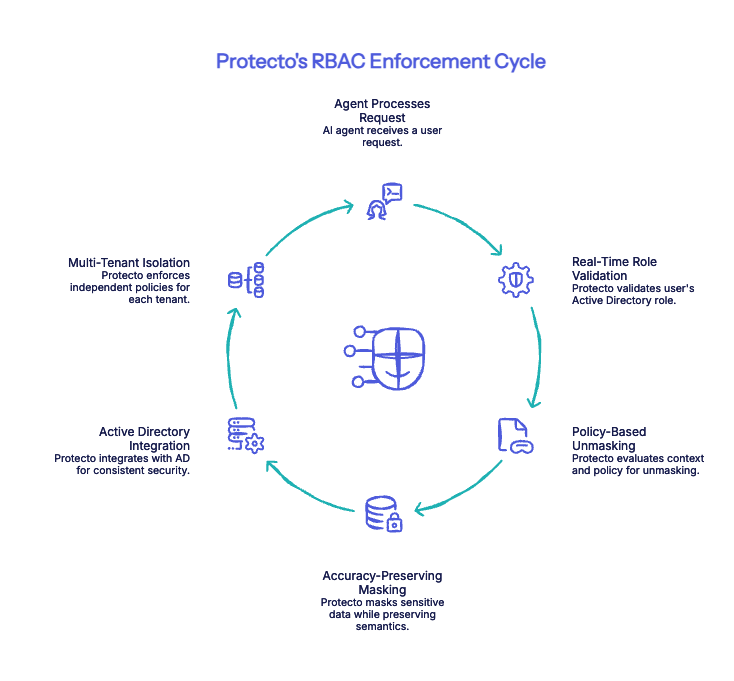
How Protecto Enforces RBAC for AI Agents
Protecto acts as the policy enforcement layer between your AI agents and your sensitive data. It integrates with your existing enterprise identity stack and enforces permissions in real time.
- Real-Time Role Validation: When an agent processes a request, Protecto checks the user’s Active Directory role and determines what data can be exposed automatically. A support agent sees masked identifiers. A senior analyst sees the full record. No manual configuration. No rule-writing per agent.
- Policy-Based Unmasking: Protecto goes beyond static RBAC by evaluating context alongside role. It considers who is asking, what the agent is doing, and what the data contains before deciding whether unmasking is permitted. This is policy-based access control for AI dynamic, not just declarative.
- Accuracy-Preserving Masking: Data masking can sometimes affect how well an LLM reasons over restricted content. Protecto is designed to preserve the semantic structure that models need to stay accurate masking sensitive fields without degrading the agent’s ability to do its job. Agents remain effective even when working with partially restricted data.
- Active Directory Integration: Protecto connects directly to enterprise AD systems, so RBAC security in AI is grounded in the same identity layer governing your non-AI systems. No duplicate policy management. No separate access stack to maintain.
- Multi-Tenant Isolation: For platforms serving multiple enterprise customers, Protecto enforces independent RBAC access control policies per tenant, and also centrally managed, cleanly separated.
The Access Control Gap You Cannot Afford to Ignore
The organizations winning with AI are not the ones that deploy the most agents, they are the ones that deploy agents they can trust. Trust requires knowing, at every moment, what your AI systems can and cannot do. Role-based access control for AI is the foundation of that trust. Without it, every AI agent you deploy is a potential compliance liability, a data breach waiting to happen, and an audit failure in progress.
With Protecto’s purpose-built RBAC for AI agents, you can move fast and stay secure by giving your AI the access it needs, and nothing more.
See how Protecto enforces role-based access for AI agents “See how it works →
FAQs
1. What is role-based access control for AI?
Role-based access control for AI gives each AI agent an identity and one or more roles. Those roles define which data sources the agent can query, which tools it can call, and which actions it can take. The agent operates only within those permissions.
2. Why does traditional RBAC fall short for AI agents?
Traditional RBAC was built for predictable systems. AI agents make hundreds of access decisions per minute, inherit user context, choose tools at inference time, and often produce no audit logs. Static roles cannot cover that behavior on their own.
3. How do you stop an AI agent from inheriting excessive privileges?
Scope permissions to the task, not to the triggering user’s full access profile. Then evaluate policy at every access decision and every agent handoff, so permissions do not pass unchecked through a multi-agent pipeline.
4. How does Protecto enforce RBAC for AI agents?
Protecto sits between your AI agents and sensitive data. It checks the user’s Active Directory role, evaluates context such as who is asking and what the data contains, and returns the data masked or unmasked based on policy. It also supports multi-tenant isolation with independent policies per tenant.