To de-identify PHI, decide what the data is for, pick the HIPAA method that fits (Safe Harbor or Expert Determination), find every identifier in both tables and free text, replace or remove it, keep each patient consistent, then test, document and control any way back. The checklist below turns that into ten practices. For the rules themselves, see our HIPAA de-identification guide; for the field-by-field engineering, see how to de-identify medical records.
The PHI de-identification checklist
1. Start from the use case
Research, internal analytics, AI training and sharing with a partner need different outputs. Write down who will use the data, for what, and whether anyone will ever need real values back. That answer decides the method and whether a mapping is kept.
2. Map everywhere PHI lives
List every source, starting with the EHR: claims, lab feeds, clinical notes, call transcripts, scanned PDFs, imaging metadata, data warehouse copies, spreadsheets and the prompts staff send to AI tools. PHI you have not mapped is PHI you will not de-identify.
3. Choose Safe Harbor or Expert Determination per dataset
Safe Harbor is simpler and repeatable: remove all 18 identifier types. Expert Determination keeps more detail, such as exact intervals or three-digit ZIP codes, but needs a documented expert opinion. Many teams use Safe Harbor for routine pipelines and Expert Determination for specific research releases.
4. Cover free text as well as columns
Most misses happen in notes and comment fields, where names, dates and phone numbers sit inside sentences. Use detection that reads text in context, and treat any free-text column inside a table as unstructured data.
5. Include the people around the patient, and your own IDs
Safe Harbor covers identifiers of relatives, employers and household members too. Add the identifiers specific to your organization, such as member numbers, encounter IDs and internal account codes, to the detection list.
6. Keep one replacement per patient
If a patient becomes one code in the claims table and a different placeholder in the notes, the records no longer link and the data loses its value. Use consistent tokens so the same value gets the same token in every dataset.
7. Separate and control any way back
If approved staff need real values, keep the mapping in a separate, protected store. Allow reveals only by role and policy, and log every one. Under HIPAA, a re-identification code must not be derived from the patient’s information, and disclosing it counts as disclosing PHI.
8. De-identify in the pipeline
Apply de-identification as data moves into the warehouse, lake or AI system, not afterwards. Every raw copy made “for now” is another place PHI can leak from.
9. Test the output before release
Review a sample of de-identified notes and records by hand, count missed identifiers, and set the level you will accept. Re-test when sources change, such as a new note template or a new data feed.
10. Document, agree and review
Record the method, the expert’s opinion if you used Expert Determination, and who can see real values. Use data use agreements that ban re-identification when you share data. Review the approach on a schedule, because data and outside datasets change over time.
Common PHI de-identification mistakes
- Masking the name column and leaving names in the notes.
- Keeping exact dates inside free text after removing date columns.
- Storing the token mapping next to the de-identified data.
- Treating a limited data set as de-identified. It is still PHI.
- Using a different placeholder for the same patient in each dataset.
Tools for de-identifying PHI
Cloud services from Azure, AWS and Google, licensed libraries and open-source projects all de-identify PHI, with big differences in free-text accuracy, consistency, re-identification and where they run. Compare seven of them in best PHI de-identification tools.
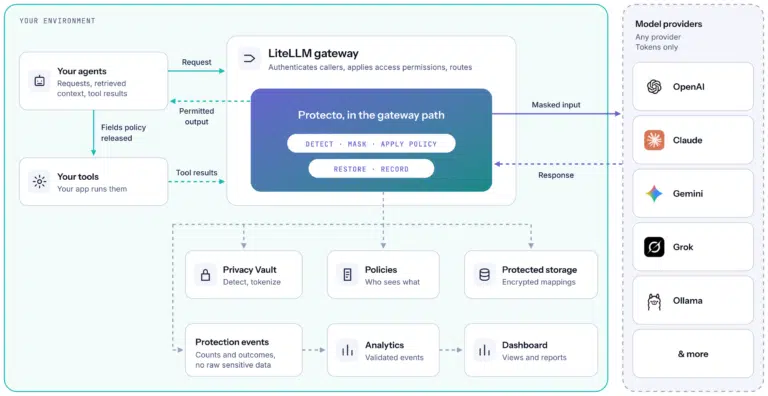
Protecto covers practices 4 to 8 in one platform: it finds PHI in columns and clinical free text, adds your own identifiers in days, gives each patient one token everywhere, keeps the mapping in a separate vault with role-based reveals and logs, and runs in your pipelines or your own environment. Inovalon tested 1,000+ documents with Protecto in under a week. See PHI de-identification for data lakes.
Frequently asked questions
What is the best way to de-identify PHI?
Match the method to the use: Safe Harbor for repeatable pipelines, Expert Determination when the data must keep more detail. Then find identifiers in both tables and free text, replace them with consistent tokens or remove them, and test a sample before release.
Who should de-identify PHI: the covered entity or a vendor?
Either can. If a vendor processes PHI for you, it is a business associate and needs a BAA. When Protecto hosts or manages the service, or has access to your installed instance, Protecto signs a BAA before PHI flows; when it runs in your environment with no Protecto access, it does not receive PHI.
Is de-identified PHI still PHI?
No, if it meets Safe Harbor or Expert Determination. Tokenized data with a mapping and limited data sets usually still are. More answers are in our HIPAA de-identification FAQ.